作者: admin

  • Fiddler抓包调试

    数据劫持

    嵌入到app里面的h5页面有时候调试接口很麻烦,需要查看给给接口传的参数是否正确,为了方便使用抓包工具。

    效果:

    在手机上访问的页面或者打开的app请求的接口在Fiddler都能监听的到
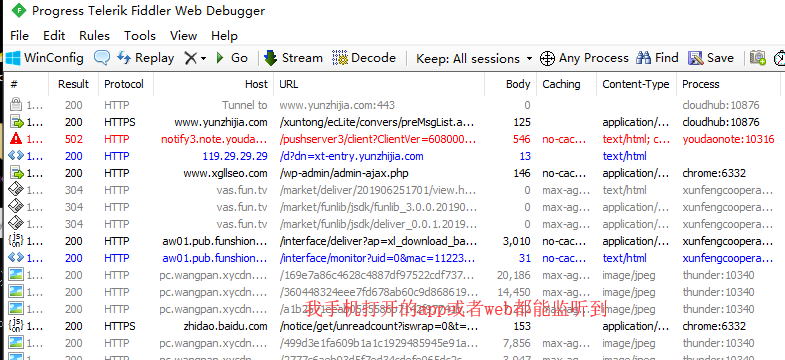
     

    前提:电脑和手机必须链接在同一个局域网上


    1,下载安装Fiddler 4,下载

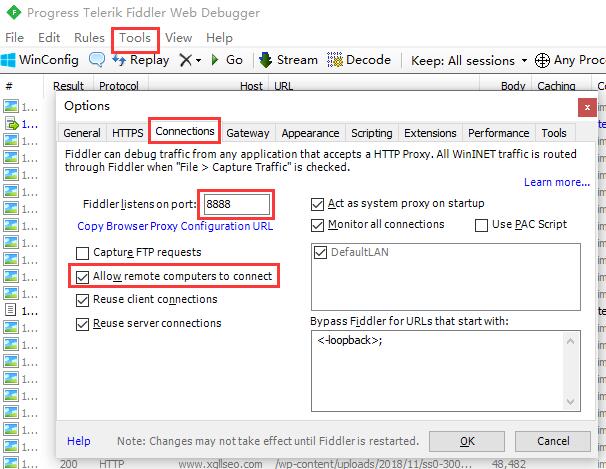
    2,配置
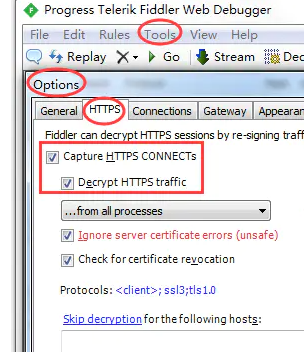
    最后点击“OK”


    3,配置手机端

    用手机访问http://电脑ip:8888/  ,安装证书
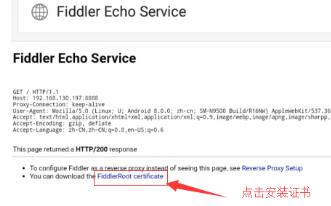


    设置手机wifi代理



    4,现在用手机访问网站或者打开app看看


    5,查看接口信息
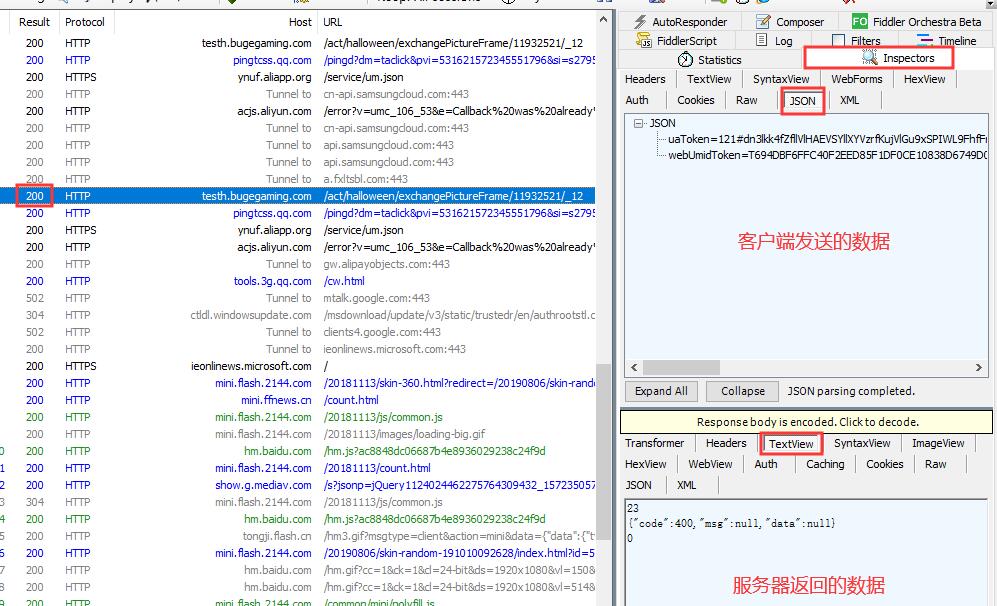
     

    代理后上不了网:解决方法

    https://blog.csdn.net/bbs11007/article/details/118965226


    https://blog.csdn.net/weixin_42802447/article/details/124917965

    过滤掉一些不想看的数据

    https://www.cnblogs.com/sunny-sl/p/6542375.html


    如果证书错误过期之类的提示参考:

    https://www.cnblogs.com/vekair/p/15932781.html
     

  • 移动端使用input type=file时没有type类型判断

    js 手机 移动 移动端 input type file type 空

    <input id="img1" type="file" name="file" accept="audio/mpeg"  />
    
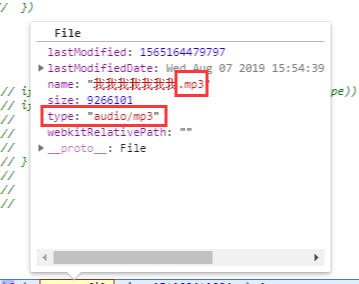
    $('#img1')[0].files[0] //获取到如下图片

    在pc端能获取到type类型,但是到了移动端就不能获取了

    type为空。


    1,解决办法

    (1)手机端判断type为空绕过不进行校验,设置input    accept=”audio/mpeg”

    (2)如果type不为空时,就进行判断只有指定类型才允许上传

    (3)后台不做任何类型校验放开


    2,解决办法

    后台或者前端对文件进行二进制流判断文件的类型

    https://segmentfault.com/q/1010000009224378


  • 解决:Uncaught TypeError: Illegal invocation报错

    在使用ajax时,出入的参数不正确才报错的。

    url :basePath+API.uploadMusic,
    type : 'post',
    clearForm : true, 
    resetForm : true, 
    data:JSON.stringify(formData),  //传入的参数不正确,才会报该错误


  • js原生拖拽上传

    原生拖放中涉及到的事件分为分下列两个阶段:

    (1)拖动某元素时,该阶段会依次触发下列事件(该阶段的事件目标–即target或srcElement都是这个被拖动元素):

    1. dragstart——鼠标移入目标元素并且按下左键触发。

    2. drag——dragstart触发后移动鼠标连续触发该事件(类似mousemove事件)

    3. dragend——拖动停止时触发(无论此时拖动元素在有效位置还是无效位置)。

    (2)当元素被拖动到一个有效的放置目标上时,触发下列事件(该阶段的事件目标–即target或srcElement都是这个目标元素):

    1. dragenter——只要有元素被拖动到放置目标上,就触发dragenter事件(类似mouseover)

    2. dragover——触发dragenter后在有效目标范围内移动时连续触发该事件

    3. dragleave——被拖动元素从目标范围内被拖出到目标范围外时触发

    4. drop——被拖动元素被放到了目标范围内(即在有效目标范围内松口鼠标左键)

    当文件被拖拽到浏览器中时,会触发默认事件,打开该文件,导致后续操作无法完成,所以必须要阻止默认事件。

    img


  • input type=file accept中可以限制的文件类型

    在上传文件的时候,需要限制指定的文件类型。

    <input type=”file” accept=”image/*” />

    accept表示可以上传文件类型,image表示图片,*表示所有支持的格式。

    image/* ,允许上传所有图片格式


    accept可以指定如下信息:

    *.3gpp

    audio/3gpp, video/3gpp

    3GPP Audio/Video

    *.ac3

    audio/ac3

    AC3 Audio

    *.asf

    allpication/vnd.ms-asf

    Advanced Streaming Format

    *.au

    audio/basic

    AU Audio

    *.css

    text/css

    Cascading Style Sheets

    *.csv

    text/csv

    Comma Separated Values

    *.doc

    application/msword

    MS Word Document

    *.dot

    application/msword

    MS Word Template

    *.dtd

    application/xml-dtd

    Document Type Definition

    *.dwg

    image/vnd.dwg

    AutoCAD Drawing Database

    *.dxf

    image/vnd.dxf

    AutoCAD Drawing Interchange Format

    *.gif

    image/gif

    Graphic Interchange Format

    *.htm

    text/html

    HyperText Markup Language

    *.html

    text/html

    HyperText Markup Language

    *.jp2

    image/jp2

    JPEG-2000

    *.jpe

    image/jpeg

    JPEG

    *.jpeg

    image/jpeg

    JPEG

    *.jpg

    image/jpeg

    JPEG

    *.js

    text/javascript, application/javascript

    JavaScript

    *.json

    application/json

    JavaScript Object Notation

    *.mp2

    audio/mpeg, video/mpeg

    MPEG Audio/Video Stream, Layer II

    *.mp3

    audio/mpeg

    MPEG Audio Stream, Layer III

    *.mp4

    audio/mp4, video/mp4

    MPEG-4 Audio/Video

    *.mpeg

    video/mpeg

    MPEG Video Stream, Layer II

    *.mpg

    video/mpeg

    MPEG Video Stream, Layer II

    *.mpp

    application/vnd.ms-project

    MS Project Project

    *.ogg

    application/ogg, audio/ogg

    Ogg Vorbis

    *.pdf

    application/pdf

    Portable Document Format

    *.png

    image/png

    Portable Network Graphics

    *.pot

    application/vnd.ms-powerpoint

    MS PowerPoint Template

    *.pps

    application/vnd.ms-powerpoint

    MS PowerPoint Slideshow

    *.ppt

    application/vnd.ms-powerpoint

    MS PowerPoint Presentation

    *.rtf

    application/rtf, text/rtf

    Rich Text Format

    *.svf

    image/vnd.svf

    Simple Vector Format

    *.tif

    image/tiff

    Tagged Image Format File

    *.tiff

    image/tiff

    Tagged Image Format File

    *.txt

    text/plain

    Plain Text

    *.wdb

    application/vnd.ms-works

    MS Works Database

    *.wps

    application/vnd.ms-works

    Works Text Document

    *.xhtml

    application/xhtml+xml

    Extensible HyperText Markup Language

    *.xlc

    application/vnd.ms-excel

    MS Excel Chart

    *.xlm

    application/vnd.ms-excel

    MS Excel Macro

    *.xls

    application/vnd.ms-excel

    MS Excel Spreadsheet

    *.xlt

    application/vnd.ms-excel

    MS Excel Template

    *.xlw

    application/vnd.ms-excel

    MS Excel Workspace

    *.xml

    text/xml, application/xml

    Extensible Markup Language

    *.zip

    aplication/zip

    Compressed Archive


    https://www.cnblogs.com/lgx5/p/5662472.html