博客

  • WordPress模板标签代码帮助中文版手册

    用WordPress来建站,我还是初学者,下面这些模板代码对我们这些初学者来说还是挺有用的,偶尔也会对模板做些修改。

    WordPress模板基本文件

    style.css 样式表文件
    index.php 主页文件
    single.php 日志单页文件
    page.php 页面文件
    archvie.php 分类和日期存档页文件
    searchform.php 搜索表单文件
    search.php 搜索页面文件
    comments.php 留言区域文件(包括留言列表和留言框)
    404.php 404错误页面
    header.php 网页头部文件
    sidebar.php 网页侧边栏文件
    footer.php 网页底部文件

    WordPress Header头部 PHP代码

    注: 也就是位于<head>和</head>之间的PHP代码

    <?php bloginfo(’name’); ?> 网站标题
    <?php wp_title(); ?> 日志或页面标题
    <?php bloginfo(’stylesheet_url’); ?> WordPress主题样式表文件style.css的相对地址
    <?php bloginfo(’pingback_url’); ?> WordPress博客的Pingback地址
    <?php bloginfo(’template_url’); ?> WordPress主题文件的相对地址
    <?php bloginfo(’version’); ?> 博客的Wordpress版本
    <?php bloginfo(’atom_url’); ?> WordPress博客的Atom地址
    <?php bloginfo(’rss2_url’); ?> WordPress博客的RSS2地址
    <?php bloginfo(’url’); ?> WordPress博客的绝对地址
    <?php bloginfo(’name’); ?> WordPress博客的名称
    <?php bloginfo(’html_type’); ?> 网站的HTML版本
    <?php bloginfo(’charset’); ?> 网站的字符编码格式

    WordPress 主体模板 PHP代码

    <?php the_content(); ?> 日志内容
    <?php if(have_posts()) : ?> 确认是否有日志
    <?php while(have_posts()) : the_post(); ?> 如果有,则显示全部日志
    <?php endwhile; ?> 结束PHP函数”while”
    <?php endif; ?> 结束PHP函数”if”
    <?php get_header(); ?> header.php文件的内容
    <?php get_sidebar(); ?> sidebar.php文件的内容
    <?php get_footer(); ?> footer.php文件的内容
    <?php the_time(’m-d-y’) ?> 显示格式为”02-19-08″的日期
    <?php comments_popup_link(); ?> 显示一篇日志的留言链接
    <?php the_title(); ?> 显示一篇日志或页面的标题
    <?php the_permalink() ?> 显示一篇日志或页面的永久链接/URL地址
    <?php the_category(’, ‘) ?> 显示一篇日志或页面的所属分类
    <?php the_author(); ?> 显示一篇日志或页面的作者
    <?php the_ID(); ?> 显示一篇日志或页面的ID
    <?php edit_post_link(); ?> 显示一篇日志或页面的编辑链接
    <?php get_links_list(); ?> 显示Blogroll中的链接
    <?php comments_template(); ?> comments.php文件的内容
    <?php wp_list_pages(); ?> 显示一份博客的页面列表
    <?php wp_list_cats(); ?> 显示一份博客的分类列表
    <?php next_post_link(’ %link ‘) ?> 下一篇日志的URL地址
    <?php previous_post_link(’%link’) ?> 上一篇日志的URL地址
    <?php get_calendar(); ?> 调用日历
    <?php wp_get_archives() ?> 显示一份博客的日期存档列表
    <?php posts_nav_link(); ?> 显示较新日志链接(上一页)和较旧日志链接(下一页)
    <?php bloginfo(’description’); ?> 显示博客的描述信息

    其它的一些Wordpress模板代码

    /%postname%/ 显示博客的自定义永久链接
    <?php the_search_query(); ?> 搜索表单的值
    <?php _e(’Message’); ?> 打印输出信息
    <?php wp_register(); ?> 显示注册链接
    <?php wp_loginout(); ?> 显示登入/登出链接
    <!–next page–> 在日志或页面中插入分页
    <!–more–> 截断日志
    <?php wp_meta(); ?> 显示管理员的相关控制信息
    <?php timer_stop(1); ?> 显示载入页面的时间
    <?php echo get_num_queries(); ?> 显示载入页面查询

  • 美国16个政府机构网站统一使用wordpress程序

    在刚刚结束的旧金山WordCamp2008上,Mark Jaquith公布了一份名单,名单显示,18个美国政府机构的官方网站使用wordpress架设,无论是公开还是私下使用。下面是这18个机构的详细名单:

      • 美国空军(Air Force)
      • 美国陆军(Army)
      • 美国中央情报局(Central Intelligence Agency) (CIA)
      • 海岸警卫队(Coast Guard)
      • 美国国防情报局(Defense Intelligence Agency)
      • 美国能源部(Department of Energy)
      • 美国国土安全局(Department of Homeland Security)


    • 国务院(Department of State)
    • 财政部(Department of Treasury)
    • 药物管理局(Drug Enforcement Agency) (DEA)
    • 海军陆战队(Marine Corps)
    • 联邦调查局(Federal Bureau of Investigation) (FBI)
    • 国家地理空间情报局(National Geospatial Intelligence Agency)
    • 美国侦查办公室(National Reconnaissance Agency)
    • 国家安全局(National Security Agency )(NSA)
    • 美国海军(Navy)

    由此可以看出wordpress的安全性和使用广泛程度都很高。

  • 李炎恢jQuery视频教程

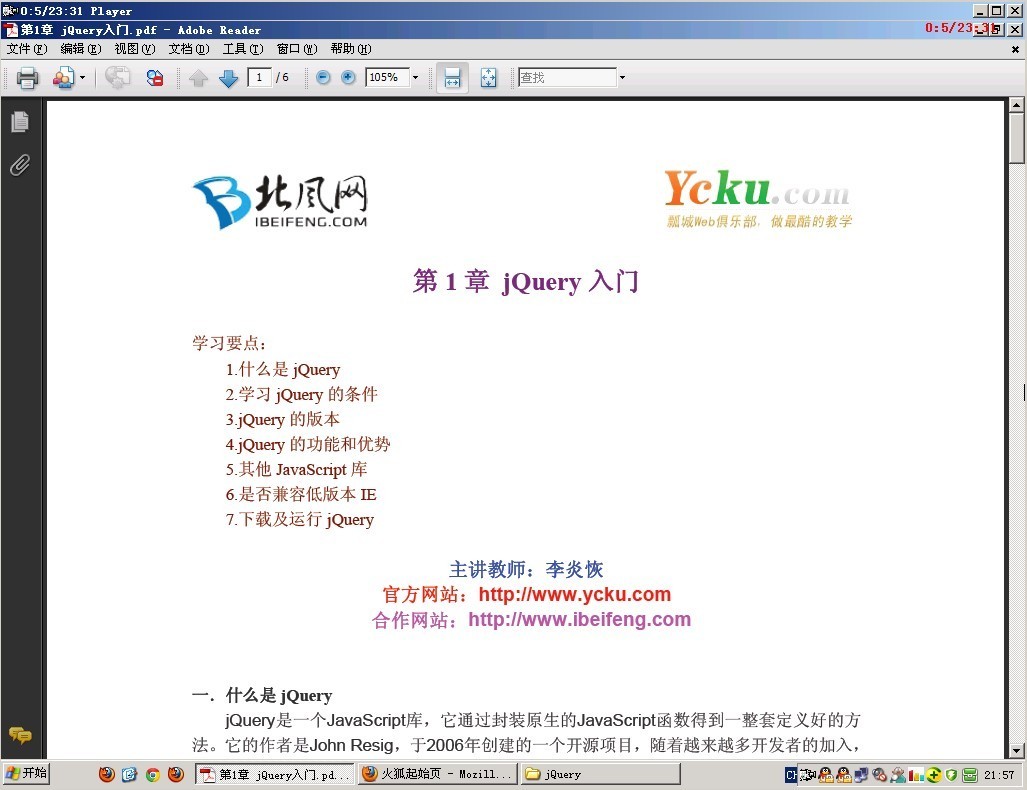
    中文名: 北风网资深讲师李炎恢jQuery视频教程

    资源格式: 压缩包
    主讲人: 李炎恢
    版本: 含UI、Mobile | 更新至19集
    发行日期: 2013年6月20日
    地区: 大陆
    对白语言: 普通话
    文字语言: 简体中文
    简介:
    IPB Image内容介绍: 

    jQuery是一个JavaScript库,它通过封装原生的JavaScript函数得到一整套定义好的方法。它的作者是John Resig,于2006年创建的一个开源项目,随着越来越多开发者的加入,jQuery已经集成了JavaScript、CSS、DOM和Ajax于一体的强大功能。它可以用最少的代码,完成更多复杂而困难的功能,从而得到了开发者的青睐。

    jQuery 最大的优势,就是特别的方便。比如模仿CSS 获取DOM,比原生的JavaScript要方便太多。并且在多个CSS 设置上的集中处理非常舒服,而最常用的CSS 功能又封装到单独的方法,感觉非常有心。最重要的是jQuery 的代码兼容性非常好,你不需要总是头疼着考虑不同浏览器的兼容问题。

    [作者简介]

    李炎恢,瓢城Web俱乐部创始人,教学总监,全国知名IT培训专家。

    内容截图:

    IPB Image

    目录:

    1 jQuery入门:Web页面动作
    2 选择器与方法:获取,行动
    3 jQuery事件与函数:在页面上有所作为
    4 jQuery Web页面管理:修改DOM
    5 jQuery效果与动画:迈出一小步,前进一大步
    6 jQuery与 JavaScript:卢克jQuery,我是你父亲!
    7 定制函数提供定制效果:你最近为我做了什么?
    8 jQuery与 Ajax:请把数据传给我
    9 处理JSON数据:客户端,来见见服务器
    10 jQuery UI:表单改头换面
    11 jQuery和API:对象,无处不在


  • 《WordPress博客平台移动版教程》(Lynda.com WordPress Mobile Solutions)[光盘镜像]

    IPB Image
    语言:英语
    网址:http://www.lynda.com/WordPress-tutorials/WordPress-Mobile-Solutions/104262-2.html
    类别:教程

    由Lynda出品的WordPress博客平台移动版教程。教学时长:44分钟,主讲:Morten Rand-Hendriksen
    教程所使用的软件:WordPress 3.x

    课程显示了如何利用现成的解决方案创建一个现有的WordPress网站的移动版本。作者Morten Rand-Hendriksen演示如何安装和配置3不同的插件:
    WP手机检测器,其中自动检测访问者的移动设备类型,并显示一个自动格式化主题;
    WPtouch ,只需点击几下转换网站到一个iPhone应用程序,风格主题;
    WordPress移动包工具包。
    Morten Rand-Hendriksen介绍了修改移动网站的外观和跟踪分析和其他统计。本课程提供了多种方式得到快速启动和运行一个时尚和灵活的移动网站,而无需修改任何代码。

    WordPress是一种使用PHP语言开发的博客平台,用户可以在支持PHP和MySQL 数据库的服务器上架设自己的网志。也可以把 WordPress 当作一个内容管理系统(CMS)来使用。WordPress 是一个免费的开源项目,在GNU通用公共许可证下授权发布。

    使用 WordPress 可以搭建功能强大的网络信息发布平台,但更多的是应用于个性化的博客。针对博客的应用,WordPress 能让您省却对后台技术的担心,集中精力做好网站的内容。

    This course shows how to create a mobile version of an existing WordPress web site by leveraging ready-made solutions. Author Morten Rand-Hendriksen demonstrates how to install and configure three different plugins: WP Mobile Detector, which automatically detects the visitor’s mobile device type and displays an auto-formatted theme; WPtouch, which transforms a site into an iPhone application-style theme with just a few clicks; and the WordPress Mobile Pack toolkit for making more fine-tuned adjustments. Morten also covers modifying the appearance of the mobile site and tracking its analytics and other stats. This course offers a variety of ways to get a stylish and nimble mobile site up and running quickly, without having to edit any code.

    Topics include:
    Installing and activating plugins
    Configuring mobile themes
    Switching themes on the fly
    Tracking analytics
    Customizing menus
    Sending push notifications

    [WordPress博客平台移动版教程].TLF-SOFT-Lynda.com.WordPress.Mobile.Solutions-iRONiSO.bin

    163.5MB
    [WordPress博客平台移动版教程].TLF-SOFT-Lynda.com.WordPress.Mobile.Solutions-iRONiSO.cue

    119B
    [WordPress博客平台移动版教程].TLF-SOFT-Lynda.com.WordPress.Mobile.Solutions-iRONiSO.nfo

    6.5KB
    163.5MB
  • jquery模仿淘宝首页侧边指定区域固定悬浮效果JQUERY SCROLL FOLLOW

    OVERVIEW

    Scroll Follow is a simple jQuery plugin that enables a DOM object to follow the page as the user scrolls. Scroll Follow has been successfully tested on IE6, IE7, FF2, FF3, Safari 3, and Opera 9 on Windows. It has been successfully tested on FF3 and Safari 3 on MacOSX.

    REQUIREMENTS

    OPTIONAL

    INSTALLATION

    1. Include jQuery:
      1. <script type=”text/javascript” src=”jquery.js”></script>
    2. Include required plugins, including Scroll Follow:
      1. <script type=”text/javascript” src=”ui.core.js”></script>
      2. <script type=”text/javascript” src=”jquery.scrollFollow.js”></script>
    3. Call Scroll Follow on the desired DOM object:
      View Example

      1. <script type=”text/javascript”>
      2.   $( ‘#example’ ).scrollFollow();
      3. </script>
    4. Or call Scroll Follow on the desired DOM object and give it some parameters:
      View Example

      1. <script type=”text/javascript”>
      2.  $( document ).ready( function () {
      3.    $( ‘#example’ ).scrollFollow( {
      4.     speed: 1000,
      5.     offset: 60,
      6.     killSwitch: ‘exampleLink’,
      7.     onText: ‘Disable Follow’,
      8.     offText: ‘Enable Follow’
      9.    } );
      10.  } );
      11. </script>
    5. The Scroll Follow object will remain inside its immediate container.
      View Example
    6. Or you can specify a parent (by ID) for the Scroll Follow object to consider its container:
      View Example

      1. <script type=”text/javascript”>
      2.  $( document ).ready( function () {
      3.   $( ‘#example’ ).scrollFollow( {
      4.    container: ‘outer’
      5.   } );
      6.  } );
      7. </script>
    7. Scroll Follow uses the “top” property of an object to slide it. Therefore, the “position” of the object must be set to either “relative” or “absolute.” Other than that limitation, the Scroll Follow object should be completely configured through CSS.
    8. http://kitchen.net-perspective.com/open-source/scroll-follow/