直接下载Office 2016并安装:https://sdifen.ctfile.com/fs/1855249-237544353
接着下载安装破解补丁密码: tfdw:https://pan.baidu.com/s/1dE4pl41

参考文章:
http://www.sdifen.com/office161.html
https://bbs.feng.com/read-htm-tid-10868252.html
直接下载Office 2016并安装:https://sdifen.ctfile.com/fs/1855249-237544353
接着下载安装破解补丁密码: tfdw:https://pan.baidu.com/s/1dE4pl41
参考文章:
http://www.sdifen.com/office161.html
https://bbs.feng.com/read-htm-tid-10868252.html
jquery 上传 拖拽上传 推荐
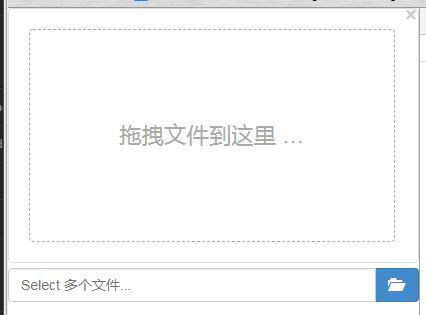
部署:
<link href="bootstrap.min.css" type="text/css" rel="stylesheet">
 <link href="fileinput.min.css" type="text/css" rel="stylesheet">
 <link href="fileinput-rtl.min.css" type="text/css" rel="stylesheet">


 <script src="jquery.min.js"></script>
 <script src="bootstrap.min.js"type="text/javascript"></script>
 <script src="fileinput.js"type="text/javascript"></script>
 <script src="zh.min.js"></script>


<form enctype="multipart/form-data">
 <input name="pic" id="input-44" type="file" multiple>  //name="image_data[]"  一次性上传多图片
                                                        //多图上传  要将ajax设置成  同步
</form>
<script>
    //version 4.2.7以上版本可以这么写

    $(document).on('ready', function() {
        $("#input-44").fileinput({
            uploadUrl: 'http://www.baidu.com',  //还写具体上传地址才显示可拖拽区域
            language: 'zh', //设置语言
            allowedFileExtensions: ['jpg', 'gif', 'png'],//接收的文件后缀
            uploadAsync: true, //默认异步上传
            showUpload:true, //是否显示上传按钮
            showRemove :true, //显示移除按钮
            showPreview :true, //是否显示预览
            showCaption:true,//是否显示长条标题
            browseClass:"btn btn-primary", //按钮样式
            dropZoneEnabled: true,//是否显示拖拽区域
            maxFileCount:10, //表示允许同时上传的最大文件个数
            enctype:'multipart/form-data',
            msgFilesTooMany: "选择上传的文件数量({n}) 超过允许的最大数值{m}!",
            msgAjaxError: 'Something went wrong with the {operation} operation. Please try again later!', //错误提示
            uploadExtraData:{"id": 1, "fileName":'123.mp3'},//上传携带参数
            maxFileCount:10, //表示允许同时上传的最大文件个数
            maxFileSize:0,//单位为kb,如果为0表示不限制文件大小
            slugCallback:function(){}, //上传前的回调
            overwriteInitial: false, //false时,本身已存在的预览图,后面在上传就继续追加而不是覆盖原来的
            previewSettingsSmall:{image: {width: "100%", height: "100%", 'max-width': "auto",'max-height': "auto"}},  //修改之前上传的预览图
            previewSettings:{image: {width: "100%", height: "100%", 'max-width': "auto",'max-height': "auto"}},  //修改刚刚上传的预览图

            initialPreview:['<img src="1.jpg">','<img src="2.jpg">'], //初始化显示出预览图
            //initialPreviewAsData: true //为true时,initialPreview数组里面的html标签就不会解析,直接显示数据了
            initialPreviewConfig: [ //初始化预览图时,为预览图设置属性
             {
               caption: '名称1',// 预览图展示的图片名称
               width: '120px',// 图片高度
               url: 'http://localhost/1.php',//删除预览图片的回调,返回的必须是json否则删除预览图的效果就没有
               key: '1a',// 删除按钮会添加data-key="1a",同时也会提交给后台key:'1a'值
               extra: {id: 11} //调用删除路径所传参数
             },
             {
               caption: '名称2',
               width: '120px',
               url: 'http://localhost/1.php',
               key: '2a',
               extra: {id: 22}
             }
            ]
        }).on("filebatchselected", function(event, files) {  //选中要上传的文件后回调
           $(this).fileinput("upload");  //自动上传

        }).on("fileuploaded", function(event, data) {
            if(data.response)
            {
                alert('处理成功');
            }
        }).on('filedeleted', function() {
             console.log(1111) //删除预览图的回调
        }).on('filebatchpreupload', function (event, data) { //该方法将在上传之前触发

        });

        //filesuccessremove  删除刚刚上传成功图片的回调
        //filebatchuploadcomplete 文件全部都上传完成才回调
        //fileuploaderror  上传文件错误后回调
        //filebatchpreupload  上传前回调
        //还有更多估计你自己看源码
    });
</script>
https://segmentfault.com/a/1190000018477200
动态生成添加预览图
预览图动态增、删其实是对属性initialPreview、initialPreviewConfig的操作,之后还需要打其刷新。
$("#input-44").fileinput('refresh', {
   initialPreview: [ //预览图片的设置
       "<img src='" + imageurl + "' class='file-preview-image' alt='肖像图片' title='肖像图片'>",
   ],
});
如果对配置进行操作后无法正常显示可以尝试监听执行refresh方法
红色提示要注意否则会造成上传无法成功
所有属性的设置案例:http://plugins.krajee.com/file-input/plugin-options#previewZoomSettings
中文参考:https://blog.csdn.net/u012526194/article/details/69937741
http://plugins.krajee.com/file-input
阻止 继承
html:
<div id="fa">
   <div id="son">
   </div>
</div>
js:
$(function () {

 $('#fa').click(function (e) {
    console.log('fa')
 });

});
以上的dom结构,son永远都是在fa的里面,当点击到son的时候其实也点击到了fa,如果希望仅仅只是点击fa才能触发时,而点击son不能触发。代码修改如下:
$('#fa').click(function (e) {
  e.stopPropagation();
  console.log('fa')
});

$('#son').click(function (e) {
  //或者 e.stopPropagation();
  console.log('son');
  return false;
});
其实很简单思维转变一下,干脆给所有子元素都添加阻止冒泡事件即可。
js 金钱 钱 格式化
效果:
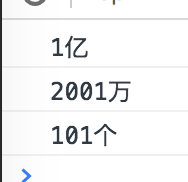
var num=120010101;

function quyi(num1) { //去除亿单位
 return Math.floor((num1 - (Math.floor(num1/100000000))*100000000));
}

if( num/100000000 >=1 ){ //过亿的
 console.log(Math.floor(num/100000000)+'亿'); //显示出亿单位


    //以下是判断亿后面的数是否过万
    if( quyi(num)/10000 >=1 ){
       console.log(Math.floor(quyi(num)/10000)+'万')

       console.log( (quyi(num)- Math.floor(quyi(num)/10000)*10000)+"个" );

    }else{
       console.log(quyi(num));
    }

}else if( (quyi(num))/10000 >=1 ){ //仅仅过万的
   console.log( Math.floor(quyi(num)/10000).toLocaleString()+'万')
   console.log( (quyi(num)- Math.floor(quyi(num)/10000)*10000)+"个" );
}else{ //没过万
   console.log(num);
}
————————————优化后———————————–
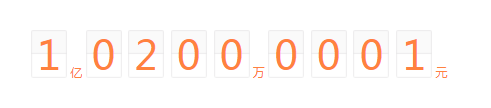
调用:
<div id="total_money">

</div>
function data_format(num) {
var str='';

//让单位包裹着span
 function company(str) {
   return '<span class="font" style="color:#FF823E;position: relative;top:0px; ">'+str+'</span>';
 }

//让每个数字都包裹这span
 function num_wrap(num) {
   var str='';
   var num_length=num.toString().length;
   for(var i=0;i<num_length;i++){
      str=str+'<span style="background:url(../../img/wap/num_bg.png) no-repeat;background-size:100%;width: 1.78rem;display: inline-block;color: #FF823E;font-size: 1.71rem;text-align: center;margin: 0 2px;position: relative;">'+(num.toString().slice(i, i+1))+'</span>';
   }

   return str;
 }

//去除亿单位
 function quyi(num1) {
   return Math.floor((num1 - (Math.floor(num1/100000000))*100000000));
 }

//补零
 function buling(num1) {
   var str0='';
   var num_length=num1.toString().length;
   for(var i=0;(4-num_length)>i;i++ ){
     str0=str0+'0';
   }
   return str0+num1;
 }

 if( num/100000000 >=1 ){ //过亿的

   str+=num_wrap(Math.floor(num/100000000))+company('亿');

  //以下是判断亿后面的数是否过万
  if( quyi(num)/10000 >=1 ){
    str+=num_wrap(buling(Math.floor(quyi(num)/10000)))+company('万');
    str+=num_wrap(buling(quyi(num)- Math.floor(quyi(num)/10000)*10000))+company('元');
  }else{
   str+=num_wrap('0000')+company('万')+num_wrap(buling(quyi(num)))+company('元');
  }

 }else if( (quyi(num))/10000 >=1 ){ //仅仅过万的
   str+=num_wrap(Math.floor(quyi(num)/10000))+company('万');
   str+=num_wrap(buling((quyi(num)- Math.floor(quyi(num)/10000)*10000)))+company('元')
 }else{ //没过万
   str+=num_wrap(num)+company('元');
 }

 $('#total_money').html(str);
}

data_format(1532136);
jquery 重复 绑定 多次 事件 多次绑定 多次事件
错误案例:
$('#aa').bind("click",function () {
 console.log('a');
});


$('#aa').bind("click",function () {
 console.log('b');
});


$('#aa').bind("click",function () {
 console.log('c');
});


//效果

a
b
c
获取最后一次绑定,修改如下:
$('#aa').unbind("click").bind("click",function () {
 console.log('a');
});


$('#aa').unbind("click").bind("click",function () {
 console.log('b');
});


$('#aa').unbind("click").bind("click",function () {
 console.log('c');
});


//效果

c
获取第一次绑定,修改如下:
$('#aa').bind("click",function (e) {
 e.stopImmediatePropagation();
 console.log('a');
});


$('#aa').bind("click",function (e) {
 e.stopImmediatePropagation();
 console.log('b');
});


$('#aa').bind("click",function (e) {
 e.stopImmediatePropagation();
 console.log('c');
});

//效果

a