作者: admin

  • keepAlive动态缓存及清除缓存

    keep-alive

    例如A,B页面,A页面开启keepAlive,B返回A的时候时缓存的,但有时需要B返回A时取消A的keepAlive缓存。

    这时候需要在A页面添加以下代码:

    {
     name: 'B',  //给B路由添加一个name名字
     path: '/B',
     component: (resolve) => require(['../components/susseccPage.vue'], resolve),
     meta: {
      title: '发布成功'
     }
    },


    beforeRouteEnter(to, from, next) { //在进入A路由前
     if (from.name == "B" && /labelStr/.test(window.location.href) ) {  //判断页面是从B过来的,且添加了一些参数
       to.meta.keepAlive = false;  
     }
     next();
    },
    vue中keepAlive使用


  • computed和watch的区别是什么?

    计算属性computed :

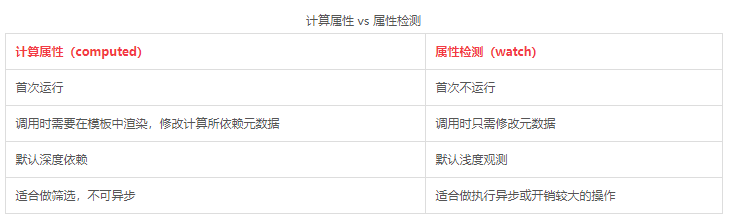
    1、支持缓存,只有依赖数据发生改变,才会重新进行计算

    2、不支持异步,当computed内有异步操作时无效,无法监听数据的变化

    3、computed 属性值会默认走缓存,计算属性是基于它们的响应式依赖进行缓存的,也就是基于data中声明过或者父组件传递的props中的数据通过计算得到的值

    4、如果一个属性是由其他属性计算而来的,这个属性依赖其他属性,是一个多对一或者一对一,一般用computed

    5、如果computed属性属性值是函数,那么默认会走get方法;函数的返回值就是属性的属性值;在computed中的,属性都有一个get和一个set方法,当数据变化时,调用set方法。


    侦听属性watch:

    1、不支持缓存,数据变,直接会触发相应的操作;

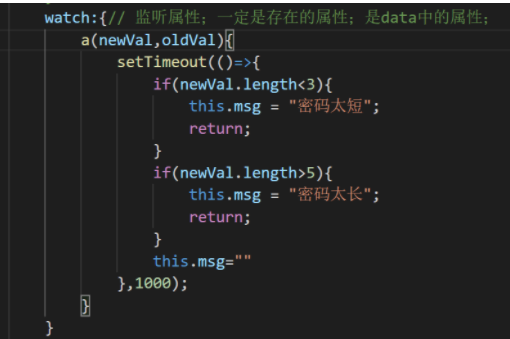
    2、watch支持异步;

    3、监听的函数接收两个参数,第一个参数是最新的值;第二个参数是输入之前的值;

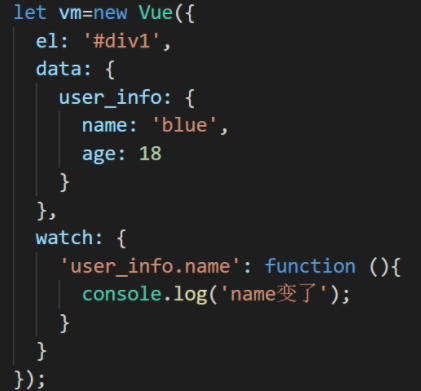
    4、当一个属性发生变化时,需要执行对应的操作;一对多;

    5、监听数据必须是data中声明过或者父组件传递过来的props中的数据,当数据变化时,触发其他操作,函数有两个参数,

    immediate:组件加载立即触发回调函数执行,

    deep: 深度监听,为了发现对象内部值的变化,复杂类型的数据时使用,例如数组中的对象内容的改变,注意监听数组的变动不需要这么做。注意:deep无法监听到数组的变动和对象的新增,参考vue数组变异,只有以响应式的方式触发才会被监听到。

    监听的对象也可以写成字符串的形式

    *最大区别:当需要在数据变化时执行异步或开销较大的操作时,这个方式是最有用的。这是和computed最大的区别,

    https://www.html.cn/qa/vue-js/20891.html


  • Vue报错(Property or method “xxx” is not defined on the instance but referenced during render.)

    报错如下:
    Property or method “xxx” is not defined on the instance but referenced during render. Make sure that this property is reactive, either in the data option, or for class-based components, by initializing the property.

    原因:
    你的“”xxx‘’属性或者”xxx”方法没有定义


    解决:

    export default { 
     data(){ 
       return{ 
         xxx:""  //去定义
       }, 
       methods:{ 
         xxx(){ } //去定义
       } 
     }, 
    }


    https://blog.csdn.net/qq_39242027/article/details/85001653


  • Ignored attempt to cancel a touchmove event with cancelable=false, for example because scrolling is in progress and cannot be interrupted

    大概意思呢就是:一个有设置cancelable=false的touchmove事件和其他某个滚动的操作冲突了。

    我们只需要将滑动报错的标签上加上一个样式即可 touch-action: none;
    touch-action :当你触摸并按住触摸目标时候,禁止或显示系统默认菜单。
    touch-action取值有一下两种
    none:系统默认菜单被禁用
    default:系统默认菜单不被禁用

    * {
      touch-action: none;
    }


  • m17 r2重装系统教程

    https://www.youtube.com/watch?v=MqiChO7VWN4


    链接: https://pan.baidu.com/s/1tEHi-hYV_xrh02-GkHgVaA 提取码: 9fqh 复制这段内容后打开百度网盘手机App,操作更方便哦
    –来自百度网盘超级会员v4的分享