作者: admin

  • 解决支付回调后台无法获取#后参数的问题

    vue hash 支付 回调

    我们在做支付页面成功后重新回调到带有hash值的页面,后台是无法获取到#后面的内容如:http://192.168.31.62:8080/#/about,/about是获取不到的

    但是vue项目都需要支持hash。

    解决:

    在首页路由的created加入以下代码:

    function getParams(name) {
      var reg = new RegExp('(^|&)' + name + '=([^&]*)(&|$)', 'i');
      var r = window.location.search.substr(1).match(reg);
      if(r) {
        return decodeURI(r[2]);
      }
      return null;
    }
    
    
    created() {
     if( getParams('id')==111 ){
       var url = window.location.protocol + "//" + window.location.host + "/?time=" + Math.random() + "#/about"
       window.location.href = url
     }
    },


    前端回调地址把

    http://192.168.31.62:8080/#/about改成http://192.168.31.62:8080/?id=111


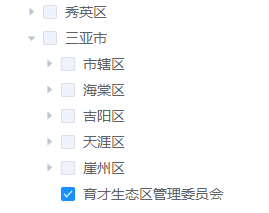
  • el-tree单选且父节点不能点击


    <el-tree
      v-if="showTree"
      :data="date"
      show-checkbox
    node-key="id"
    ref="tree"
    check-strictly
    :highlight-current='true'
    :check-on-click-node="true"
    :accordion="true"
    :default-checked-keys="[checkedkey]"
    :default-expanded-keys="checkedkey"
    :props="defaultProps"
    :default-expand-all="false"
    @check-change="parentModules"
    @check="currentChecked"
    ></el-tree>


          date: [
            {
            moduldCode: 1,
            jgmc: '一级 2',
            disabled:true,
            children: [{
              moduldCode: 3,
              jgmc: '二级 2-1',
              disabled:true,
              children: [{
                moduldCode: 4,
                jgmc: '三级 3-1-1'
              }, {
                moduldCode: 5,
                jgmc: '三级 3-1-2',
              }]
            }, {
              moduldCode: 2,
              jgmc: '二级 2-2',
              disabled:true,
              children: [{
                moduldCode: 6,
                jgmc: '三级 3-2-1'
              }, {
                moduldCode: 7,
                jgmc: '三级 3-2-2',
              }]
            }]
           }
          ],
          checkedkey: [],
          defaultProps: {
            // children: "child",
            // label: "moduleName",
            label: "jgmc",
            // id:'moduldCode' //可要可不要
          },
          // 取uniqueValue值的时候,列:uniqueValue[0]否则会是一个数组
          uniqueValue:'',//最后拿到的唯一选择的moduldCode值,相当于id
          showTree:false
    
    methods: {
     currentChecked (nodeObj, SelectedObj) {
       console.log(SelectedObj)
       console.log(SelectedObj.checkedKeys) // 这是选中的节点的key数组
       console.log(SelectedObj.checkedNodes) // 这是选中的节点数组
     },
      //节点选择状态发生改变时
      parentModules(data,checkbox,node){
       if(checkbox){
         // 注意:后端返回的node-key不是id,是moduldCode
        this.$refs.tree.setCheckedKeys([data.id]); //data.moduldCode 根据自己需求改,我这个是moduldCode,上面data配置中我已经修改了的
        this.uniqueValue = this.$refs.tree.getCheckedKeys().toString(); //不加上toString()会报:期望一个数字或者字符串,结果返回的是数组
       }else{
        this.uniqueValue = this.$refs.tree.getCheckedKeys().toString();
        if(this.uniqueValue.length == 0){
          this.uniqueValue = ''
        }
       }
     },
    
    }


    指定默认被选中项目:

    checkedkey: ['id']  //


    初始化:不展开,都不被选中

    this.$nextTick(function (){
     this.checkedkey = [];
     this.showTree = true
    })


    参考:https://www.cnblogs.com/tlfe/p/11693772.html

    http://hanwenblog.com/post/20.html
     

  • centos 7安装mongodb 4.2社区版(免费)

    https://mongodb.net.cn/manual/tutorial/install-mongodb-on-red-hat/


    0,防火墙

    sudo systemctl status firewalld  //active(running)就意味着防火墙打开了
    sudo systemctl stop firewalld  //关闭
    sudo systemctl disable firewalld  //禁用防止自动重启

    https://jingyan.baidu.com/article/49ad8bce97bd965834d8fa8b.html


    1,创建文件/etc/yum.repos.d/mongodb-org-4.2.repo

    新增内容如下:
    [mongodb-org-4.2]
    name=MongoDB Repository
    baseurl=https://repo.mongodb.org/yum/redhat/$releasever/mongodb-org/4.2/x86_64/
    gpgcheck=1
    enabled=1
    gpgkey=https://www.mongodb.org/static/pgp/server-4.2.asc


    2,安装MongoDB软件包。

    要安装最新的稳定版MongoDB,请发出以下命令:

    sudo yum install -y mongodb-org

    另外,要安装特定版本的MongoDB,请分别指定每个组件包,并将版本号附加到包名中,如以下示例所示:

    sudo yum install -y mongodb-org-4.2.6 mongodb-org-server-4.2.6 mongodb-org-shell-4.2.6 mongodb-org-mongos-4.2.6 mongodb-org-tools-4.2.6

    您可以指定任何可用的MongoDB版本。但是yum ,当有新版本可用时,将升级软件包。为防止意外升级,请固定包装。要固定包,exclude请在/etc/yum.conf文件中添加以下指令:

    exclude=mongodb-org,mongodb-org-server,mongodb-org-shell,mongodb-org-mongos,mongodb-org-tool


    3,默认、操作

    /var/lib/mongo (数据目录)
    /var/log/mongodb (日志目录)

    /etc/mongod.conf  //修改端口,设置是否允许对外远程连接

    sudo systemctl start mongod  //启动

    sudo systemctl stop mongod  //停止MongoDB

    sudo systemctl restart mongod  //重新启动MongoDB


    4,mongodb可视化工具

    https://robomongo.org/download

    或者使用

    Studio3T

    1、安装完成后,把附件解压丢到Studio 3T 目录下跟Studio 3T.exe同一文件夹即可。
    默认门路为:C:\Program Files\3T Software Labs\Studio 3T。
    2、以后通过工具启动即可享受无限30试用的效果!

    链接:https://pan.baidu.com/s/1BfCmqOHFOjtkupNgU__bdg
    提取码:477n
    –来自百度网盘超级会员V5的分享