作者: admin

  • 修改WordPress后台 自定义后台登入地址

    “出来混迟早要还”在网上也难免不了被黑客盯上修改默认的后台路径是必要的网上找了很多这类似的方法修改起来很麻烦,这也不说了问题是没效果,现在介绍大家自定义WordPress后台登入地址的方法。

    1,打开wp-login.php这个文件,找到<!DOCTYPE html>,在其上面插入下面的代码:

    2,

    [code]<?php
    if($_GET[“zhe”]!=”li”){
    header(‘Location: https://sdeno.com/’);
    }
    echo ‘<h1 style=”text-align:center;margin-top:30px;”>这里是如假包换的后台!</h1>’;
    ?>[/code]

    3,做完这些步骤之后,你的后台只能通过 https://sdeno.com/wp-login.php?zhe=li 来访问如果直接输入https://sdeno.com/wp-admin/就自动跳转到首页。

  • 如何提高WordPress访问速度前台不加载多语言包

    宽带紧张的同学提高宽带速度不现实我们可以尽量禁用WordPress不必要的功能来提高WordPress访问速度,这里我们禁用多语言包达到提速目的,通过修改 wp-config.php 文件来阻止 WordPress 在前台加载语言包。

    先打开打开 wp-config.php 文件,

    require_once(ABSPATH . ‘wp-settings.php’);改成下面的代码:

    [code]if(WP_ADMIN === true) {
    define (‘WPLANG’, ‘zh_CN’);
    } else {
    define (‘WPLANG’, ‘xxxxxxxxx’);
    }
    require_once(ABSPATH . ‘wp-settings.php’);[/code]

    这个方法原理是通过改变 WPLANG 常量使 WordPress 不能正确加载语言包从而提高运行速度。通过测试,去除语言包后,WordPress 运行速度可以提高 0.3~0.5s 左右不知道是不是心里作用~汗!。

  • 个性jquery 飘云 浮云效果

    想拥有一个个性的博客免不了添加一些有个性的效果,jquery飘云浮云效果个人觉得还不错,现在放出来一起共享学习。

    1,加载jquery库。

    2,加载yun.js文件。

    3,html代码部分:

    [code]<body>
    <div id=”clouds”>

    内容

    </div>

    </body>[/code]

    4,样式代码部分:

    [code]#clouds { background:url(‘图片路径’) repeat-x scroll 0 0 transparent; width:100%; }[/code]

    效果跟本站顶部的一样。

  • 有个性的jquery导航效果

    有个性的jquery水平滑动导航效果,效果跟本站首页导航一样。

    1,加载jquery库。

    2,加载jquery-ui.min.jsjquery.spasticNav.js文件。

    3,HTML代码部分:

    [code]<ul id=”menu”>
    <li id=”menu-item-402″><a href=”#”>Home</a></li>
    <li><a href=”#”>About</a></li>
    <li><a href=”#”>Blog</a></li>
    <li><a href=”#”>More About My Portfolio</a></li>
    <li><a href=”#”>Contact</a></li>
    </ul>[/code]

    4,最后加载

    [code]<script type=”text/javascript”>
    $(‘#menu’).spasticNav();
    </script>[/code]

    5,样式代码:

    [code]ul, li {
    margin: 0; padding: 0;
    }

    #blob {

    border-right: 1px solid #0059ec;
    border-left: 1px solid #0059ec;
    position: absolute;
    top: 0;
    z-index : 1;
    background: #0b2b61;
    background: -moz-linear-gradient(top, #0b2b61, #1153c0);
    background: -webkit-gradient(linear, left top, left bottom, from(#0b2b61), to(#1153c0));
    -moz-border-radius: 4px;
    -webkit-border-radius: 4px;
    -moz-box-shadow: 2px 3px 10px #011331;
    -webkit-box-shadow: 2px 3px 10px #011331;

    }

    #menu {
    position: relative;
    background: #292929;
    float: left;
    }

    #menu li {
    float: left;
    list-style: none;
    border-right: 1px solid #4a4a4a;
    border-left: 1px solid black;
    }

    #menu li a {
    color: #e3e3e3;
    position: relative;
    z-index: 2;
    float: left;
    font-size: 30px;
    font-family: helvetica, arial, sans-serif;
    text-decoration: none;
    padding: 30px 45px;
    }[/code]
  • 表格table隔行换色以及点击整行变色

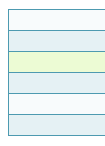
    表格table隔行换色以及点击整行变色这个是很实用的表格效果

    效果如图:

    table1

    javascript代码部分:

    [code]<script language=”javascript”><!–
    function senfe(o,a,b,c,d){
    var t=document.getElementById(o).getElementsByTagName(“tr”);
    for(var i=0;i<t.length;i++){
    t[i].style.backgroundColor=(t[i].sectionRowIndex%2==0)?a:b;
    t[i].onclick=function(){
    if(this.x!=”1″){
    this.x=”1″;
    this.style.backgroundColor=d;
    }else{
    this.x=”0″;
    this.style.backgroundColor=(this.sectionRowIndex%2==0)?a:b;
    }
    }
    t[i].onmouseover=function(){
    if(this.x!=”1″)this.style.backgroundColor=c;
    }
    t[i].onmouseout=function(){
    if(this.x!=”1″)this.style.backgroundColor=(this.sectionRowIndex%2==0)?a:b;
    }
    }
    }
    –></script>[/code]


    [code]<script language=”javascript”><!–
    //senfe(“表格名称”,”奇数行背景”,”偶数行背景”,”鼠标经过背景”,”点击后背景”);
    senfe(“changecolor”,”#f8fbfc”,”#e5f1f4″,”#ecfbd4″,”#bce774″);
    –></script>[/code]

    HTML代码部分:

    [code]<table class=”warp_table” id=”changecolor”>
    <tr>
    <td>&nbsp;</td>
    <td>&nbsp;</td>
    <td>&nbsp;</td>
    </tr>
    <tr>
    <td>&nbsp;</td>
    <td>&nbsp;</td>
    <td>&nbsp;</td>
    </tr>
    <tr>
    <td>&nbsp;</td>
    <td>&nbsp;</td>
    <td>&nbsp;</td>
    </tr>
    <tr>
    <td>&nbsp;</td>
    <td>&nbsp;</td>
    <td>&nbsp;</td>
    </tr>
    <tr>
    <td>&nbsp;</td>
    <td>&nbsp;</td>
    <td>&nbsp;</td>
    </tr>
    <tr>
    <td>&nbsp;</td>
    <td>&nbsp;</td>
    <td>&nbsp;</td>
    </tr>
    </table>[/code]