作者: admin

  • 电子签名通用组件

    html:

    <canvas></canvas>
    <div>
        <button onclick="cancel()">取消</button>
        <button onclick="save()">保存</button>
    </div>


    js:

    <script>
        // 配置内容
        const config = {
            width: 400, // 宽度
            height: 200, // 高度
            lineWidth: 5, // 线宽
            strokeStyle: 'red', // 线条颜色
            lineCap: 'round', // 设置线条两端圆角
            lineJoin: 'round', // 线条交汇处圆角
        }
    
        // 获取canvas 实例
        const canvas = document.querySelector('canvas')
        // 设置宽高
        canvas.width = config.width
        canvas.height = config.height
        // 设置一个边框
        canvas.style.border = '1px solid #000'
        // 创建上下文
        const ctx = canvas.getContext('2d')
    
        // 设置填充背景色
        ctx.fillStyle = 'transparent'//透明背景色
        // 绘制填充矩形
        ctx.fillRect(
            0, // x 轴起始绘制位置
            0, // y 轴起始绘制位置
            config.width, // 宽度
            config.height // 高度
        );
    
        // 保存上次绘制的 坐标及偏移量
        const client = {
            offsetX: 0, // 偏移量
            offsetY: 0,
            endX: 0, // 坐标
            endY: 0
        }
    
        // 判断是否为移动端
        const mobileStatus = (/Mobile|Android|iPhone/i.test(navigator.userAgent))
    
        // 初始化
        const init = event => {
            // 获取偏移量及坐标
            const { offsetX, offsetY, pageX, pageY } = mobileStatus ? event.changedTouches[0] : event
    
            // 修改上次的偏移量及坐标
            client.offsetX = offsetX
            client.offsetY = offsetY
            client.endX = pageX
            client.endY = pageY
    
            // 清除以上一次 beginPath 之后的所有路径,进行绘制
            ctx.beginPath()
            // 根据配置文件设置相应配置
            ctx.lineWidth = config.lineWidth
            ctx.strokeStyle = config.strokeStyle
            ctx.lineCap = config.lineCap
            ctx.lineJoin = config.lineJoin
            // 设置画线起始点位
            ctx.moveTo(client.endX, client.endY)
            // 监听 鼠标移动或手势移动
            window.addEventListener(mobileStatus ? "touchmove" : "mousemove", draw)
        }
        // 绘制
        const draw = event => {
            // 获取当前坐标点位
            const { pageX, pageY } = mobileStatus ? event.changedTouches[0] : event
            // 修改最后一次绘制的坐标点
            client.endX = pageX
            client.endY = pageY
    
            // 根据坐标点位移动添加线条
            ctx.lineTo(pageX , pageY )
    
            // 绘制
            ctx.stroke()
        }
        // 结束绘制
        const cloaseDraw = () => {
            // 结束绘制
            ctx.closePath()
            // 移除鼠标移动或手势移动监听器
            window.removeEventListener("mousemove", draw)
        }
        // 创建鼠标/手势按下监听器
        window.addEventListener(mobileStatus ? "touchstart" : "mousedown", init)
        // 创建鼠标/手势 弹起/离开 监听器
        window.addEventListener(mobileStatus ? "touchend" :"mouseup", cloaseDraw)
    
        // 取消-清空画布
        const cancel = () => {
            // 清空当前画布上的所有绘制内容
            ctx.clearRect(0, 0, config.width, config.height)
        }
        // 保存-将画布内容保存为图片
        const save = () => {
            // 将canvas上的内容转成blob流
            canvas.toBlob(blob => {
                // 获取当前时间并转成字符串,用来当做文件名
                const date = Date.now().toString()
                // 创建一个 a 标签
                const a = document.createElement('a')
                // 设置 a 标签的下载文件名
                a.download = `${date}.png`
                // 设置 a 标签的跳转路径为 文件流地址
                a.href = URL.createObjectURL(blob)
                // 手动触发 a 标签的点击事件
                a.click()
                // 移除 a 标签
                a.remove()
            })
        }
    </script>


  • vue电子签名组件

    适用vue2,vue3

    调用:

    <sign @onContent="getimg"></sign>
    
    
    import sign from "../../components/sign";
    
    export default {
       components:{sign},
       methods:{
           getimg(e){
             console.log(e) //base64
           }
       }
    }


    组件:

    <template>
      <div class="signatureBox">
        <div ref="canvasHW" class="canvasBox">
          <canvas ref="canvasF"
                  @touchstart="touchStart"
                  @touchmove="touchMove"
                  @touchend="touchEnd"
                  @mousedown="mouseDown"
                  @mousemove="mouseMove"
                  @mouseup="mouseUp">
          </canvas>
        </div>
        <div class="signature-btnArea">
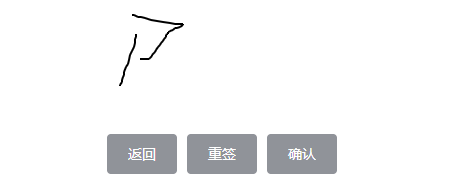
          <el-button class="btn" type="info" @click.native.prevent="handleGoBack()">返回</el-button>
          <el-button class="btn" type="info" @click.native.prevent="handleOverwrite()">重签</el-button>
          <el-button class="btn" type="info" @click.native.prevent="handleSubmit()">确认</el-button>
        </div>
      </div>
    </template>
    
    <script>
    export default {
      name: 'ESignature',
      data() {
        return {
          points: [],
          canvasTxt: null,
          stage_info: [],
          startX: 0,
          startY: 0,
          moveY: 0,
          moveX: 0,
          isDown: false,
          strokeStyle: '#000',
          lineWidth: 2
        }
      },
      mounted() {
        this.initCanvas()
      },
      methods: {
        // 初始化Canvas
        initCanvas() {
          let canvas = this.$refs.canvasF
          // 获取画布的高度
          canvas.height = this.$refs.canvasHW.offsetHeight - 20
          // 获取画布的宽度
          canvas.width = this.$refs.canvasHW.offsetWidth - 20
          // 创建 context 对象
          this.canvasTxt = canvas.getContext('2d')
          this.stage_info = canvas.getBoundingClientRect()
        },
        // 鼠标按下事件 - 准备绘画
        mouseDown(ev) {
          ev = ev || event
          ev.preventDefault()
          if (ev) {
            let obj = {
              x: ev.offsetX,
              y: ev.offsetY
            }
            this.startX = obj.x
            this.startY = obj.y
            this.canvasTxt.beginPath()
            this.canvasTxt.moveTo(this.startX, this.startY)
            this.canvasTxt.lineTo(obj.x, obj.y)
            this.canvasTxt.stroke()
            this.canvasTxt.closePath()
            this.points.push(obj)
            this.isDown = true
          }
        },
        // 触摸开始事件 - 准备绘画
        touchStart(ev) {
          ev = ev || event
          ev.preventDefault()
          if (ev.touches.length == 1) {
            let obj = {
              x: ev.targetTouches[0].clientX - this.stage_info.left,
              y: ev.targetTouches[0].clientY - this.stage_info.top
            }
            this.startX = obj.x
            this.startY = obj.y
            this.canvasTxt.beginPath()
            this.canvasTxt.moveTo(this.startX, this.startY)
            this.canvasTxt.lineTo(obj.x, obj.y)
            this.canvasTxt.stroke()
            this.canvasTxt.closePath()
            this.points.push(obj)
          }
        },
        // 鼠标移动事件 - 开始绘画
        mouseMove(ev) {
          ev = ev || event
          ev.preventDefault()
          if (this.isDown) {
            let obj = {
              x: ev.offsetX,
              y: ev.offsetY
            }
            this.moveY = obj.y
            this.moveX = obj.x
            this.canvasTxt.strokeStyle = this.strokeStyle
            this.canvasTxt.lineWidth = this.lineWidth
            this.canvasTxt.beginPath()
            this.canvasTxt.moveTo(this.startX, this.startY)
            this.canvasTxt.lineTo(obj.x, obj.y)
            this.canvasTxt.stroke()
            this.canvasTxt.closePath()
            this.startY = obj.y
            this.startX = obj.x
            this.points.push(obj)
          }
        },
        // 触摸移动事件 - 开始绘画
        touchMove(ev) {
          ev = ev || event
          ev.preventDefault()
          if (ev.touches.length == 1) {
            let obj = {
              x: ev.targetTouches[0].clientX - this.stage_info.left,
              y: ev.targetTouches[0].clientY - this.stage_info.top
            }
            this.moveY = obj.y
            this.moveX = obj.x
            // 设置线条颜色
            this.canvasTxt.strokeStyle = this.strokeStyle
            // 设置线条宽度
            this.canvasTxt.lineWidth = this.lineWidth
            // 绘制开始路径
            this.canvasTxt.beginPath()
            // 定义线条开始坐标
            this.canvasTxt.moveTo(this.startX, this.startY)
            // 定义线条结束坐标
            this.canvasTxt.lineTo(obj.x, obj.y)
            // 绘制线条
            this.canvasTxt.stroke()
            this.canvasTxt.closePath()
            this.startY = obj.y
            this.startX = obj.x
            this.points.push(obj)
          }
        },
        // 松开鼠标事件 - 停止绘画
        mouseUp(ev) {
          ev = ev || event
          ev.preventDefault()
          if (ev) {
            let obj = {
              x: ev.offsetX,
              y: ev.offsetY
            }
            this.canvasTxt.beginPath()
            this.canvasTxt.moveTo(this.startX, this.startY)
            this.canvasTxt.lineTo(obj.x, obj.y)
            this.canvasTxt.stroke()
            this.canvasTxt.closePath()
            this.points.push(obj)
            this.points.push({ x: -1, y: -1 })
            this.isDown = false
          }
        },
        // 触摸结束事件 - 停止绘画
        touchEnd(ev) {
          ev = ev || event
          ev.preventDefault()
          if (ev.touches.length == 1) {
            let obj = {
              x: ev.targetTouches[0].clientX - this.stage_info.left,
              y: ev.targetTouches[0].clientY - this.stage_info.top
            }
            this.canvasTxt.beginPath()
            this.canvasTxt.moveTo(this.startX, this.startY)
            this.canvasTxt.lineTo(obj.x, obj.y)
            this.canvasTxt.stroke()
            this.canvasTxt.closePath()
            this.points.push(obj)
            this.points.push({ x: -1, y: -1 })
          }
        },
        // 返回
        handleGoBack() {
          this.handleOverwrite()
          this.$emit('on-back')
        },
        // 重写
        handleOverwrite() {
          this.canvasTxt.clearRect(0, 0, this.$refs.canvasF.width, this.$refs.canvasF.height)
          this.points = []
        },
        // 提交
        handleSubmit() {
          if (this.points.length < 50) {
            if (this.points.length == 0) {
              this.$message.error('请填写你的名称');
            }
            return
          }
          this.$emit('on-content', this.$refs.canvasF.toDataURL())
          this.handleOverwrite()
        }
      }
    }
    </script>
    
    <style scoped>
    
    </style>


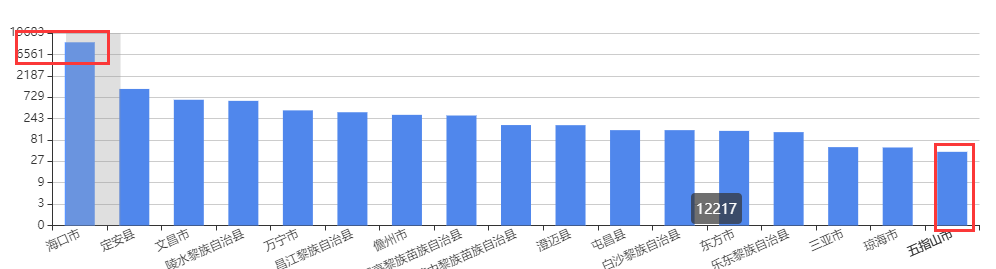
  • echart值太小无法点击问题

    bar之间的差值太大导致一些bar点击不到的解决方法:

    数据相差很大高度相同,设置对数的基数 min:1, logBase:3,这个基数是可以随时调整的。

    yAxis: [
            {
                type: 'log',
                min:1,
                logBase:3,
                axisLabel: {
                  formatter: (params) => {
                    return params === 1 ? 0 : params;
                  },
                },
            }
        ],


  • vue动态字符串dom模板中添加@click事件

    vue 动态 字符串 模板 dom 事件

    1,第一步添加字符串必须加()否则会解析成字符串

    var currentText = `点击此处 【<a onclick="popwin('${res.data}')" style='color: #2478f2'>购药登记</a>】登记购买。 `;


    2.created中声明

    created() {
        window.popwin=this.popwin;
    },


    3.method中声明函数

    methods:{
       popwin(e){
    
       }
    }


    https://blog.csdn.net/weixin_42256142/article/details/126249323


  • No matching version found for

    No matching version found for说明你所使用的npmjs源下载依赖包没有找到,解决方法:

    1,试着删除package-lock.josn在npm i安装

    2,或者手动在根目录创建一个node_modules文件夹让同事把你所找不到的那的文件发你在直接复制到该目录里面

    3,或者让同事把他的node_modules直接打包发你