作者: admin

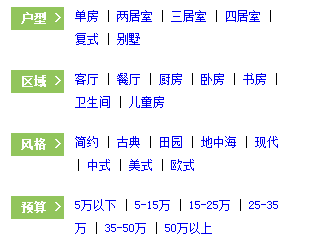
  • css标签展示

    [code]<!DOCTYPE html PUBLIC “-//W3C//DTD XHTML 1.0 Transitional//EN” “http://www.w3.org/TR/xhtml1/DTD/xhtml1-transitional.dtd”>
    <html xmlns=”http://www.w3.org/1999/xhtml”>
    <head>
    <meta http-equiv=”Content-Type” content=”text/html; charset=utf-8″ />
    <title>无标题文档</title>
    <style>
    body {
    font: 12px “宋体”,”Arial Narrow”,HELVETICA;
    }
    *{
    margin:0;
    padding:0;
    }
    .d4eabb {
    border-color: #d4eabb;
    }
    .bor {
    border: 1px solid #ceddf1;
    border-top: 0px;
    }
    .pad {
    padding: 10px 14px;
    }
    .bd .cf {
    padding-bottom: 17px;
    line-height: 23px;
    }
    .bd .noPadding {
    padding-bottom: 0px;
    }
    .bd .cf {
    padding-bottom: 17px;
    line-height: 23px;
    }
    .bd label {
    display: inline-block;
    background: #92c55c;
    padding-left: 10px;
    padding-right: 3px;
    color: #fff;
    vertical-align: top;
    font-weight: bold;
    margin-top: 2px;
    }
    .bd span {
    display: inline-block;
    width: 205px;
    margin-left: 5px;
    }
    .bd span a {
    padding: 1px 0;
    }
    a {
    text-decoration: none;
    }
    .bd span a:hover {
    background: #ffdd69;
    color: #333;
    }
    </style>
    </head>

    <body>
    <div class=”bd pad” bosszone=”diyBd”>
    <div class=”cf”>
    <label>户型 &gt; </label>
    <span>
    <a href=”http://www.xx.com/diy/property/open/single/” target=”_blank”>单房</a> |
    <a href=”http://www.xx.com/diy/property/open/twoBedRoom/” target=”_blank”>两居室</a> |
    <a href=”http://www.xx.com/diy/property/open/threeBedRoom/” target=”_blank”>三居室</a> |
    <a href=”http://www.xx.com/diy/property/open/fourBedRoom/” target=”_blank”>四居室</a> |
    <a href=”http://www.xx.com/diy/property/open/compound/” target=”_blank”>复式</a> |
    <a href=”http://www.xx.com/diy/property/open/villadom/” target=”_blank”>别墅</a> </span> </div>
    <div class=”cf”>
    <label>区域 &gt; </label>
    <span>
    <a href=”http://www.xx.com/diy/property/area/parlour/” target=”_blank”>客厅</a> |
    <a href=”http://www.xx.com/diy/property/area/restaurant/” target=”_blank”>餐厅</a> |
    <a href=”http://www.xx.com/diy/property/area/kitchen/” target=”_blank”>厨房</a> |
    <a href=”http://www.xx.com/diy/property/area/bedchamber/” target=”_blank”>卧房</a> |
    <a href=”http://www.xx.com/diy/property/area/sanctum/” target=”_blank”>书房</a> |
    <a href=”http://www.xx.com/diy/property/area/toilet/” target=”_blank”>卫生间</a> |
    <a href=”http://www.xx.com/diy/property/area/babyRoom/” target=”_blank”>儿童房</a> </span> </div>
    <div class=”cf”>
    <label>风格 &gt; </label>
    <span>
    <a href=”http://www.xx.com/diy/property/style/brief/” target=”_blank”>简约</a> |
    <a href=”http://www.xx.com/diy/property/style/classicality/” target=”_blank”>古典</a> |
    <a href=”http://www.xx.com/diy/property/style/gardenCity/” target=”_blank”>田园</a> |
    <a href=”http://www.xx.com/diy/property/style/mediterranean/” target=”_blank”>地中海</a> |
    <a href=”http://www.xx.com/diy/property/style/modern/” target=”_blank”>现代</a> |
    <a href=”http://www.xx.com/diy/property/style/chinese/” target=”_blank”>中式</a> |
    <a href=”http://www.xx.com/diy/property/style/continuous/” target=”_blank”>美式</a> |
    <a href=”http://www.xx.com/diy/property/style/eustachian/” target=”_blank”>欧式</a> </span> </div>
    <div class=”cf noPadding”>
    <label>预算 &gt; </label>
    <span>
    <a href=”http://www.xx.com/diy/property/budget/fiveMyriad/” target=”_blank”>5万以下</a> |
    <a href=”http://www.xx.com/diy/property/budget/fifteen/” target=”_blank”>5-15万</a> |
    <a href=”http://www.xx.com/diy/property/budget/fifty/” target=”_blank”>15-25万</a> |
    <a href=”http://www.xx.com/diy/property/budget/thirtyfold/” target=”_blank”>25-35万</a> |
    <a href=”http://www.xx.com/diy/property/budget/bigNumber/” target=”_blank”>35-50万</a> |
    <a href=”http://www.xx.com/diy/property/budget/superstate/” target=”_blank”>50万以上</a> </span> </div>
    </div>
    </body>
    </html>[/code]

  • 教你如何让google baidu收录网站最快最多

    通常情况下,百度最快收录新站3天左右,google收录稍慢点,一周左右吧!不过要想真正的在最短的时间内被搜索引擎收录还是有方法可实施的!
     
    一般的方法,大家首先想到的可能是登陆各大搜索引擎,一个个向搜索引擎提交自己的网站URL.这种方法已经过时了,现在已是最被动,最没效的方法。 GoogleGuy也曾说过,向Google提交URL的重要性在降低,这种提交的吸引力对于Google越来越小。对于这部分提交Google的数据更新非常之慢。如果你只使用这种方法可能两个月也列不到Google上。
     
    还有就是向一些公开目录提交,比如 DMOZ.org等。对于一个新的网站,内容还不多,想列入这些大型目录会是相当一个漫长的过程,可能需要很长时间。因此想通过这个被 Google等搜索引擎快速找到,也是不可取的。当然你提交一下,等着慢慢被收录也是可以的。
     
    下面就要说的是最快的最好的方法,那就是获得尽可能多的外部链接。这些链接不一定在链接网站的首页,在其内页就OK.事实上,你的网站刚建成,还没有什么访问量,想找一些好的首页链接也是不太容易的。最好找一些PR值高一点(比如5以上),内容天天更新而且更新较多的网站,这些网站Google会每天漫游并更新其数据库。当Google漫游这些站点时发现了你的URL,就会顺着URL Crawl你的网站。笔者以前曾多次使用这种方法,非常有效,当然现在不用了,直接在一个稍高PR的网站首页做个链接就OK.
     
    通常使用何种方法2-4天就会被Google和MSN列入。Yahoo稍慢一点,可能需要1-2周,这和其搜索技术有关系。怎么才能在一些PR高,更新快的网站做一些链接呢?其实很简单,很多网站都有论坛或允许评论,做个签名带上自己的网站地址,发几个帖子或评论就行了。但这种URL一定要是活动的,就是点击可以到达你得网站的。根据笔者的经验,Google在发现你的URL之后,当天就会对你的网站漫游,漫游后一到两天,在Google搜索你的网址,就会发现你的网站已被列入了。首次列入的将只是你的首页,这一点Google和MSN一样。
     
    接下来再谈谈前面提过的获得尽量多的链接的原因。如果你只有一个链接,几天内被Google列入是没问题,但首次只是首页,要等到Google收录更多的页面还需要一定时间,可能1-3周。这是因为Google对一个新站的漫游周期会比较长。如果你有较多的链接在外面,当Google漫游那些网站时,发现你的网址就会再次过来Crawl你的网站,越多Google Crawl的越频繁,这时就会深度漫游你的网站,收录更多的页面。这就会大大缩短Google的收录时间,使Google在较短的时间内收录更多的页面。
     
    在对一个新的网站进行收录时,笔者的经验是,Google反应最快,收录最快,MSN 次之,Yahoo最慢。Google几天内列入后,如果链接多的话,过不了几天就会再次收录,在加上你的网站天天更新,内容更新平凡,内部URL结构合理,要不了一个月,就会深度漫游,全部收录你的网页。MSN的列入速度和Google差不多,也是很快的。但一般只是收录首页,到再次收录更多页面时,可能需要2周-3周左右。这期间你到MSN查看你得网站的话,会看到总是一个首页在那里。1-2个月后,MSN对你的网站就可完全收录了。Yahoo的反映是最慢,无论收录首页还是深度Crawl都是最慢的,首次需要1-2周,到完全收录可能需要2-3月。
     
    最后,抛弃那些主动向搜索引擎提交链接的被动办法吧,多做一些高质量的外部链接,你会有意想不到的收获。

  • WordPress 百度插件生成的地图页面打开成了404页面

    我按教程安装了百度与谷歌插件 ,谷哥地图正常常,可百度插件生成的地图打开却成了404页面要在httpd.conf规则中加入这两条

    [code]RewriteRule /sitemap_baidu.xml /sitemap_baidu.xml [L]
    RewriteRule /sitemap.html /sitemap.html [L][/code]

  • wordpress后台登录后显示:“您无法编辑该条目,因为它现在在回收站中。请先将其恢复,然后再重试。”

    后台路径不对。Wordpress可以从两个地址进入后台登陆,一个是域名+/wp-admin/index.php,另一个就是域名+wp-login.php。从/wp-admin/index.php路径进去就能打开了。

  • table注册表单验证及初始化插件Koo.js

    验证表单

    使用说明

    Koo.js标签验证插件基于Jquery开发,为KooTeam.com而生,取名Koo.js。使用十分简便,不需写任何代码即可实现各种的表单验证,同时支持select,checkbox,radio等默认值,一个标签全部搞定。

    在线讨论:http://www.oschina.net/p/koojs

    [code]1.页面中引入jquery.js库和koo.js
    2.加入如下代码

        <script type="text/javascript" />
            $(document).ready(function () { $('form').Koo(); });
        </script>[/code]

    3.验证标签对象是check自定义属性,多重验证标签以“-”符号分隔。例如:check=”need-mail”:表示必填字段,且只能输入邮箱,check=”date-need”:表示输入框会自动加载日期控件,且输入值不能为空。

    4.自定义提示,把需要提示的信息,覆盖到title属性上,在验证的时候便提示自定义的提示信息。例如:check=”need” title=”干嘛输入空值呢?”,在验证不通过时会提示:“干嘛输入空值呢?”,而不是默认的”不能为空”

    5.修改提示样式,在你的css中给.kootip这个样式定义规则即可,默认样式 .kootip{color:red;line-height:16px;}

    验证标签

    need:输入框数据不能为空

    举例:<input check=”need” />效果:

    digit:只能输入数字

    举例:<input check=”digit” />效果:

    chinese:只能输入中文字符

    举例:<input check=”chinese” />效果:

    card:只能输入身份证号

    举例:<input check=”card” />效果:

    zip:只能输入邮编

    举例:<input check=”zip” />效果:

    float:只能输入浮点数字

    举例:<input check=”float” />效果:

    tel:只能输入电话号码

    举例:<input check=”tel” />效果:

    mobile:只能输入手机号码

    举例:<input check=”mobile” />效果:

    char:只能输入英文字符串

    举例:<input check=”char” />效果:

    money:只能输入金额

    举例:<input check=”money” />效果:

    mail:只能输入邮件地址

    举例:<input check=”mail” />效果:

    !+标签:可以为空,如果不为空则必须要符合验证规范

    举例:<input check=”!digit” />表示可以为空,但必须符合digit规范效果:

    =id:验证是否与对应的标签值相等

    举例:<input id=”test1″ /><input check=”=test1″ />
    表示两个输入框的内容必须相等效果:输入:

    /id:验证两个输入字段至少要输入一个

    举例:<input id=”test1″ /><input check=”/test1″ />效果:输入:

    >id:验证后面输入的数字要比前面的大

    举例:<input id=”test1″ /><input check=”>test1″ />效果:输入:

    *id:验证后面输入的日期要比前面的大

    举例:<input id=”test1″ /><input id=”test2-*test1″ />效果:输入:

    l number:验证输入长度等于number

    举例:<input id=”test1″ /><input name=”test2″ id=”test2-l200″ />输入:

    > number:验证输入数字大于number

    举例:<input check=”>200″ />
    输入:

    < number:验证输入数字小于number

    举例:<input check=”<200″ />
    输入:

    日期控件

    date:给输入框绑定日期控件

    举例:<input check=”date” />输入:

    默认值

    select:给Select下拉框设置默认值及验证

    举例:<select check=”val” /></select />若val与option的value相等,则自动选中实例

    checkbox:绑定CheckBox默认选中框

    举例:<input type=”checkbox” check=”val” />若val与checkbox的值相等,则自动选中输入:

    radio:绑定Radio默认选中框

    举例:<input type=”radio” check=”val” />若val与radio的值相等,则自动选中输入:

    原作者:http://www.kooteam.com/koo/index.htm

    下载:koo.js验证表单