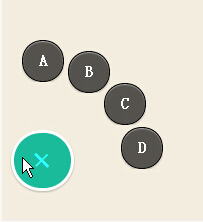
jQuery Wheel Menu
http://www.cnblogs.com/lhb25/p/path-like-wheel-menu-with-jquery.html

进度条加载效果,兼容IE7以上浏览器
$(document).ready(function(){
  $('#sample_goal').goalProgress({
   goalAmount: 100,  //总进度
   currentAmount: 50, //目前
   textBefore: '', //数字前显示文本
   textAfter: '' //数字后显示文本
  });
 });
http://pan.baidu.com/s/1o67PivK
页面过渡
animatedModal.js效果也基于animate.css完成
HTML:
 <div id="modal-02">

   <div class="close-modal-02">  //关闭的class注意 close-modal-02
    CLOSE MODAL
   </div>
   <div class="modal-content">

   </div>

 </div>
简单介绍基本参数:
$("#demo02").animatedModal({    // 默认点击#demo02触发
   modalTarget:'modal-02',      // 弹窗的ID名
   animatedIn:'lightSpeedIn',   //弹出淡入效果
   animatedOut:'bounceOutDown', //关闭时的淡出效果
   color:'red',                 //背景颜色
   animationDuration:'2s',     //过渡时间
   overflow:'scroll',         //是否要滚动条
 // Callbacks
 beforeOpen: function() {     //弹出前的回调
   console.log("The animation was called");
 },
 afterOpen: function() {    //弹出后
   console.log("The animation is completed");
 },
 beforeClose: function() {  //关闭前
   console.log("The animation was called");
 },
 afterClose: function() {    //关闭后
   console.log("The animation is completed");
 }
 });
默认参数:
| Variable | Default Value | Options | Description |
|---|---|---|---|
| modalTarget | animatedModal | Customize your target | |
| color | #39BEB9 | HEX, HSL, RGB, RBA | Define background color |
| animatedIn | zoomIn | Choose Here | Transition when the modal goes in |
| animatedOut | zoomOut | Choose Here | Transition when the modal goes out |
| animationDuration | .6s | seconds | Animation duration |
| overflow | auto | scroll; hidden; auto; | This makes your modal scrollable or not |
官网:http://joaopereirawd.github.io/animatedModal.js/
类似效果:http://www.jq22.com/plugin/830
推荐看这txt:requirejs
首先要知道为什么要使用requirejs?
1,防止JS阻塞浏览器渲染。例如我们执行alert时,在alert代码之后的html就会停止加载页面的内容就不会在出现了。
2,防止页面加载过多JS相互依赖时,页面出现过多的<script type=”text/javascript”></script>页面变丑。
这是我们需要requirejs的2大理由,还有其他一些附加功能也方便我们维护JS。
require会定义三个变量:define,require,requirejs,其中require === requirejs,一般使用require更简短
/********************以下是基本用法********************/
require([],fn) //第一个参数必须是数组放索引0位置的先执行,第二个参数是回调函数也就是第一个参数里面的js加载成功后才执行。
<script type="text/javascript" src="js/require.js"></script> //首先加载requirejs
<script type="text/javascript">
  require(["js/a"]); // require就相当于加载器,a其实就是a.js不能加.js
  require(["js/a"],function(){ //参数1:加载的js,参数2:参数1的js加载成功后的回调函数
    alert("load finished");
  })
</script>
定义一个模块a.js 必须用define()
// a.js
define(function(){
   function fun1(){
     alert("it works");
   }
   fun1();
})
加载a.js模块 加载一个模块要用require()
require(["js/a"]);
需要注意:在AMD规范中优先加载依赖模块,也就是依赖前置,例如:
define(function (require, exports, module) {
  var a =require('./modulevv');  //1
  console.log('a');  //2
  var b =require('./moduleuu');  //3
  console.log('b');  //4
});
加载顺序是:1,3,2,4
只要是对外引入了依赖模块,就会优先加载依赖模块
不支持软加载,例如:
if(false){
   require('./moduleuu');
}
//就算是false,也会加载到moduleuu模块
为a.js模块返回一个回调
 require(["js/a"],function(){
    alert("load finished");   //加载a模块完成后返回一个回调函数
 })
给js文件自定义别名,先加载远程文件如果失败在加载本地文件。paths
在回调的函数中如果依赖jquery就在参数中添加$,如果还有别的依赖还可以添加。
 require.config({
   paths : {
    "jquery" : ["http://xx/jquery/2.0.3/jquery", "js/jquery"], //别名:['先加载1','备用地址1','备用地址2']
    "a" : "js/a"
   }
})

require(["jquery","a"],function($){
  $(function(){
    alert("load finished");
  })
})
我们把require.config的配置加入到data-main后,以后每个页面使用下面的代码就行了
//创建一个 main.js以后这个就是入口了
<script data-main="js/main" src="js/require.js"></script>
解决不支持AMD插件的加载问题
shim可以为requirejs加载非AMD规范的其他库
shim也可以解决模块依赖加载顺序的问题,例如jquery ui依赖jquery先执行后才能正常运行。
requirejs.config( {
  "shim": {
      "grid" : ["jquery"]  //grid依赖jquery先加载后才能执行
  }
});
我们用的最多的jquery插件很多都不支持AMD,而我们使用require.js默认是以AMD加载JS的,为了保证jquery插件在jquery.js加载完之后才执行,所以要使用shim
require.config({
  shim: {
      "jquery.form" : {
          deps : ["jquery"]         //jquery.form依赖jquery,也就是先加载jquery后才能加载jquery.form
          exports:["jquery.form"]  //表明这个模块外部调用时的名称
      },
      'avalon': {
          exports: "avalon" //将avalon对象在requirejs中暴露出来
      },
      'jquery-1.8.3.min':{
          exports: "$"
      }
  }

  require(['jquery.form'],function(){  //由于之前设置好了依赖关系可以直接加载jquery.form
                                       //这样默认先加载jquery,后才加载jquery.form
  });
})
也可以简写为:
// 简写用在avalon上没成功,还是不推荐简写吧
require.config({
  shim: {
    "jquery.form" : ["jquery"]   //这个是deps的简写
  }
})
这样配置之后我们就可以使用加载插件后的jquery了
require.config(["jquery", "jquery.form"], function($){
   $(function(){
     $("#form").ajaxSubmit({...});
   })
})
或者我们修改插件让插件支持AMD加载
;(function (factory) {
   if (typeof define === "function" && define.amd) {
      // AMD模式
      define([ "jquery" ], factory);
   } else {
      // 全局模式
      factory(jQuery);
   }
}(function ($) {
  /*---------我们代码---------------- */
    $.fn.extend({
       'color':function(value1,value2){
           $(this).css({'color':value1,'background':value2});
       }
    });
  /*---------我们代码---------------- */
}));
在老版本的jquery中,是没有继承AMD规范的,所以不能直接require[“jquery”],这时候就需要shim,比如我要是用underscore类库,但是他并没有实现AMD规范,那我们可以这样配置
require.config({
   shim: {
      "underscore" : {
         exports : "_";
      }
   }
})
这样配置后,我们就可以在其他模块中引用underscore模块:
require(["underscore"], function(_){
     _.each([1,2,3], alert);
})
shim中的init在不使用define()模块加载其他js
我们知道要在requirejs中加载js就必须定义在define()模块中,其他的模块才能加载
使用shim中的init就可以不需要,如:
// c.js

function c(){
  alert('11');
}


function w(){
  alert('11');
}
shim: {
   c:{ //这里指的是c.js
      init:function(){
         return{
            c0:c, //c和w指的是函数体的名称
            c1:w
          }
       }
    }
},


require(['c'],function(fn){
  console.log(fn);  //fn就是返回的对象 {c0:c,c1:w}
})
baseUrl路径
data-main="js/main" //这里的main.js里面所写的代码将在加载完reuqire.js后处理,这里需要到data-*自定义属性所以IE7以下不支持
如果需要每个页面都要加载到的JS代码就写在main.js即可。
这里注意以下路径问题"js/main"就相当于
require.config({
 baseUrl : "js"
})
也就是说原来需要 "js/a"现在只写成 "a"就行了
版本号更新
//要在加载require.js之前写上
<script>
 var require = {
 urlArgs: "ver=" + (new Date()).getTime()
 };
</script>
<script data-main="js/main" src="js/require.js"></script>
版本号冲突问题map
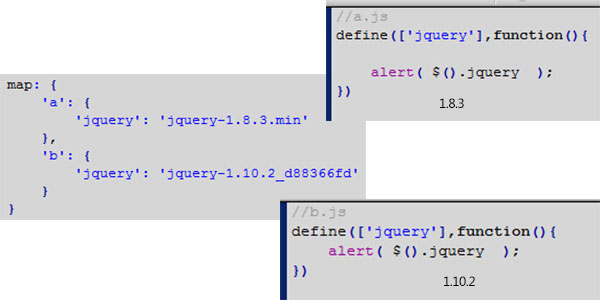
map: {
   '*': {  //默认其他模块都使用此jq版本号
     'jquery': 'jquery-1.10.2.min'
   },
  'a': {  //指定a.js模块使用此版本号
     'jquery': 'jquery-1.8.3.min'
   }
 }
requirejs推荐一个JS一个模块,模块变量和方法之间的访问
例如:
a.js
define([],function(){   //*注意 即使没有要载入的模块默认也要加入空数组[]
   var obj={  //对象里面的变量和方法都是私有的
     wo:'我',
     run:function(){
       return this.wo+'-----';
     }
  };

  return{ //对外提供接口
    wo:obj.wo,
    run:obj.run()
  }
})
hello.js依赖a.js才能获取到数据
define(['a'],function(a){
  alert(a.run);
})
main.js开始加载hello.js
require(['hello']);
让某些模块优先比其他模块先加载
priority:['text','css'] //text.js和css.js模块优先比其他模块先加载
模块对外提供接口
*注意模块的命名不能使用module.js这种关键字名称
当 exports 与 init 同时存在的时候, exports 将被忽略。
 //home.js


define(['jquery'],function($){
   function run(){
      $(function(){
        alert( $().jquery );
      })
   }

   return{
     hello:run
   }
});
//在main.js中调用,
 require(["home"],function(home){
    home.hello();
 });

哪里都可以调用home.hello();只要加载就行
错误回调
如果当模块加载失败时候也需要回调处理
require(["mmRouter1","a1"], function(e,a) {

},function(err){
  var failedId = err.requireModules && err.requireModules[0];
  console.log(failedId)  //输出 错误的模块名称,有多少个模块出错就输出多少个 mmRouter1  a1
})
requirejs 提供DOM加载 类似jquery ready()方法
domReady下载和用法:https://sdeno.com/?p=5034
config所有参数:https://github.com/jrburke/r.js/blob/master/build/example.build.js
http://www.w3cschool.cc/w3cnote/requirejs-tutorial-1.html
http://www.runoob.com/w3cnote/requirejs-tutorial-1.html
其他教程:
http://www.uihtm.com/requirejs-plug-in.html
http://www.cnblogs.com/snandy/archive/2012/05/22/2513652.html
http://www.runoob.com/w3cnote/requirejs-tutorial-1.html
requirejs跟seajs差不多都属于模块管理插件,简单来说就是将页面上的众多加载js的文件综合整理,让首页只加载一条js文件,让页面代码看起来简洁。
直接放例子:
以下是常规的做法:
JS:
<script src="js/jquery-1.8.3.min.js"></script>
<script src="js/velocity.min.js"></script>
<script src="js/velocity.ui.js"></script>
<script>
 $(function(){

  $.Velocity.RegisterUI("callout.zidingyi", {
    defaultDuration: 3000,
    calls: [
      [ { rotateZ: 1080 }, 0.50 ],
      [ { scaleX: 0.5 }, 0.25, { easing: "spring" } ],
      [ { scaleX: 1 }, 0.25, { easing: "spring" } ]
    ]
  });
  $('.c').velocity('callout.zidingyi');

 });
</script>
HTML:
<div class="c">1</div>
<div class="c">2</div>
<div class="c">3</div>
如果遇到大项目的时候JS文件加载更多,而且还要考虑JS加载的依赖顺序。
以下是引用requirejs修改后的代码:
JS:
<script data-main="js/main" src="js/require.js"></script>
对首页就只加载一条JS文件即可。
重点是要介绍main.js文件,如下:
require.config({
  shim: {
    velocity:['jquery'], //要加载velocity先加载jquery,以下类同
    velocityui: ['velocity'],
    jshome:['velocityui'],
  },
  paths: {
    jquery: 'jquery-1.8.3.min', //jquery是jquery-1.8.3.min的别名以下类同
    velocity:'velocity.min',
    jshome:'1', //这里的1.js就是自己要写的逻辑代码
    velocityui : 'velocity.ui',
  }
});

require(['jshome']); //在shim上设置依赖加载顺,所以这里加载jshome会按顺序加载jquery>velocity>velocityui>jshome

以后需要哪些依赖的模块只需要引入别名即可,也要保持顺序,例如要依赖jquery和velocity.min:
require(['jquery','velocity'],function(){  //这里就引入了2个依赖文件
    // 这里写自己需要的代码
});
Require.js中使用jQuery 插件
虽然jQuery的支持AMD的API, 这并不意味着jQuery插件也是和AMD兼容的。
(function ($) {
$.fn.myPlugin = function () {
//你自己的插件代码
};
})(jQuery);
不过我们稍微修改一下就可以使用Require.js加载一个jQuery插件:
;(function (factory) {
 if (typeof define === "function" && define.amd) {
 // AMD模式
 define([ "jquery" ], factory);
 } else {
 // 全局模式
 factory(jQuery);
 }
}(function ($) {
   $.fn.jqueryPlugin = function () {
     //插件代码
   };
}));
Require.js中使用jQuery UI组件
Require.js中使用jQuery UI组件也类似的,只要改造一下jQuery Widget Factory 代码就可以了,并且感觉jQuery UI的依赖关系加载就可以了。例如:
(function (widgetFactory) {
if (typeof define === "function" && define.amd) {
 // AMD模式
 define("jquery.ui.widget", ["jquery"], function () {
widgetFactory(window.jQuery);
});
 } else {
 // 全局模式
 widgetFactory(window.jQuery);
 }
}
(function ($, undefined) {
// jQuery Widget Factory 代码
}));