
作者: admin
-
javascript Image对象的一些理解
js new image()
当我们在写html页面的时候加入了<img name=”myimg”> 标签的时候就相当于new Image()了一个对象了。如果不相信可以使用
console.log(document);
你会发现在document对象中添加了名字为myimg的属性了,而myimg值就是一个img对象,就等于了new Image()了一个对象,添加多个就有多个Image()对象。
相反我们不在html中添加<img>标签,也可以直接
var img=new Image();
console.log(img);
这样其实也添加了一个<img>标签只是没插入到html而已你看不到。
尽然new Image()是一个对象那么他也就自带属性和方法,可以使用
console.log(new Image());
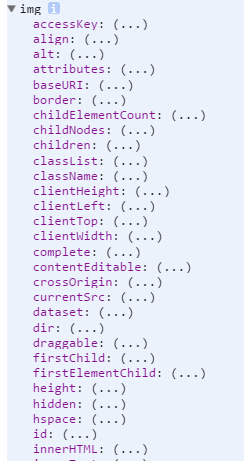
还有很多就不一一列举出了,利用image对象可以实现预加载图片的效果。
http://www.englishfree.com.cn/schoolfree/cn/computer/text/java/033.htm
-
js判断指定div或区域内的图片加载是否完成
js 判断 指定 图片 加载 完成
第一:
 var i=0;
 var str='';
 $('#body img').each(function (index) {
  this.id='img'+index; //先给图片设置好ID,利用ID获取图片(不知道为什么用$(this)设置值不能设  置,获取就可以)
 var img = new Image();

 img.onload = function () { //图片加载成功时
   i++;
   $('#img'+index)[0].className='asdf'+index;
   //console.log($(this).attr('src') + ' - 成功');
   str=str+$('#img'+index)[0].className;
   if(i == $('img').length) {
     domIsReady(); //全部图片加载完成才会触发
   }
 }


  img.onerror=function(){ //图片加载失败时

  }

  img.src = $(this).attr('src');

});

function domIsReady(){ //全部图片加载完成才会触发
   document.title=str;
};
或者:
去除var img = new Image();(因为每加载一个img就会自动创建一个imgage对象)
第二:
var i=0;
 var str='';
 $('#body img').each(function (index) {
    this.id='img'+index; //先给图片设置好ID,利用ID获取图片(不知道为什么用$(this)设置值不能设置,获取就可以)
 // console.log(this)
   this.onload = function () { //图片加载成功时
   i++;
    $('#img'+index)[0].className='asdf'+index;
    //console.log($(this).attr('src') + ' - 成功');
    str=str+$('#img'+index)[0].className;
    if(i == $('img').length) {
      domIsReady(); //全部图片加载完成才会触发
    }
 }


  this.onerror=function(){ //图片加载失败时

  }

  this.src = $(this).attr('src');

});


function domIsReady(){ //全部图片加载完成才会触发
    document.title=str;
 };
说第二种方法思路:
利用each()遍历指定区域内的img,每加载一个<img>标签就等于创建一个了new Image()对象,在each()遍历获取this的同时this就是Image对象,然而Image对象又拥有onload和onerror方法。
onload方法:图片一旦加载完成并显示出来就会触发。
onerror方法:图片加载失败就会触发。
第一种方法多了一个new Image()感觉没必要因为没加载到一个<img>的时候就等于new Image()了一个对象了。
加载图片成功时候: demo
加载图片很难的时候:demo1
-
解决:iphone iframe内的页面不能滑动问题
苹果 iphone iframe 滚动 滑动
使IFRAME在iOS设备上支持滚动

HTML代码
在使用IFRAME或者其他HTML元素时,你需要使用一个元素(如DIV)来包装他们:<div class="scroll-wrapper"> <iframe src=""></iframe> </div> 这个DIV将作为支持内部滚动的基础容器。
CSS 代码
要让IFRAME支持滚动,需要一个常用的CSS属性和一个很少人知道的CSS属性(property):.scroll-wrapper { -webkit-overflow-scrolling: touch; overflow-y: scroll; /* 提示: 请在此处加上需要设置的大小(dimensions)或位置(positioning)信息! */ } .scroll-wrapper iframe { /* 你自己指定的样式 */ }-webkit-overflow-scrolling: touch; 属性值就是专为浏览器中溢出(overflow)时需要滚动的元素设计的。 如果没有指定这个属性,当你想滚动iframe时,实际上会导致外层页面的滚动,通过它你就可以对IFRAME的滚动进行控制! 在原作者的博客站点中,使用了下面的CSS:
.demo-iframe-holder { position: fixed; right: 0; bottom: 0; left: 0; top: 0; -webkit-overflow-scrolling: touch; overflow-y: scroll; } .demo-iframe-holder iframe { height: 100%; width: 100%; } -
图片测试
一些加载很卡的图片有时加载成功有时不能,用来做测试
<div id="body">
<img alt="" src="http://lorempixel.com/100/100?0.6412381180562079">
<img alt="" src="http://lorempixel.com/100/100?0.7218343850690871">
<img alt="" src="http://lorempixel.com/100/100?0.8123387461528182">
<img alt="" src="http://lorempixel.com/100/100?0.5473052232991904">
<img alt="" src="http://lorempixel.com/100/100?0.08298367634415627">
<img alt="" src="http://lorempixel.com/100/100?0.23120151390321553">
<img alt="" src="http://lorempixel.com/100/100?0.579969818238169">
<img alt="" src="http://lorempixel.com/100/100?0.6712699658237398">
<img alt="" src="http://lorempixel.com/100/100?0.06116446293890476">
<img alt="" src="http://lorempixel.com/100/100?0.849479554919526">
<img alt="" src="http://lorempixel.com/100/100?0.9978046675678343">
<img alt="" src="http://lorempixel.com/100/100?0.6169894095510244">
<img alt="" src="http://lorempixel.com/100/100?0.5886299991980195">
<img alt="" src="http://lorempixel.com/100/100?0.043275466887280345">
<img alt="" src="http://lorempixel.com/100/100?0.39082411653362215">
<img alt="" src="http://lorempixel.com/100/100?0.5571696639526635">
<img alt="" src="http://lorempixel.com/100/100?0.6919373392593116">
<img alt="" src="http://lorempixel.com/100/100?0.5619146721437573">
<img alt="" src="http://lorempixel.com/100/100?0.33584441361017525">
<img alt="" src="http://lorempixel.com/100/100?0.1819094845559448">
<img alt="" src="http://lorempixel.com/100/100?0.7498404355719686">
<img alt="" src="http://lorempixel.com/100/100?0.523766971193254">
<img alt="" src="http://lorempixel.com/100/100?0.5618475298397243"><img alt="" src="http://lorempixel.com/100/100?0.18910795915871859"><img alt="" src="http://lorempixel.com/100/100?0.6667511356063187"><img alt="" src="http://lorempixel.com/100/100?0.519311421783641"><img alt="" src="http://lorempixel.com/100/100?0.20512736774981022"><img alt="" src="http://lorempixel.com/100/100?0.5268201881553978"><img alt="" src="http://lorempixel.com/100/100?0.43518508900888264"><img alt="" src="http://lorempixel.com/100/100?0.4523033113218844"><img alt="" src="http://lorempixel.com/100/100?0.10721616703085601"><img alt="" src="http://lorempixel.com/100/100?0.08922939863987267"><img alt="" src="http://lorempixel.com/100/100?0.6325619716662914"><img alt="" src="http://lorempixel.com/100/100?0.9569438647013158"><img alt="" src="http://lorempixel.com/100/100?0.7967558708041906"><img alt="" src="http://lorempixel.com/100/100?0.7185957750771195"><img alt="" src="http://lorempixel.com/100/100?0.25543069979175925"><img alt="" src="http://lorempixel.com/100/100?0.3638617619872093"><img alt="" src="http://lorempixel.com/100/100?0.4856136597227305"><img alt="" src="http://lorempixel.com/100/100?0.6657451926730573"><img alt="" src="http://lorempixel.com/100/100?0.4432305018417537"><img alt="" src="http://lorempixel.com/100/100?0.47664213459938765"><img alt="" src="http://lorempixel.com/100/100?0.9193885892163962"><img alt="" src="http://lorempixel.com/100/100?0.6934680512640625"><img alt="" src="http://lorempixel.com/100/100?0.44828678644262254"><img alt="" src="http://lorempixel.com/100/100?0.5476593663915992"><img alt="" src="http://lorempixel.com/100/100?0.3104967549443245"><img alt="" src="http://lorempixel.com/100/100?0.21036282181739807"><img alt="" src="http://lorempixel.com/100/100?0.8341504216659814"><img alt="" src="http://lorempixel.com/100/100?0.5473040267825127"></div>