作者: admin

  • node text/html与text/plain有什么区别?

    node 图片 文件 类型

    MIME是服务器通知客户机传送文件是什么类型的主要方法,客户机浏览器也通过MIME告诉服务器它的参数。(服务器要向浏览器客服端传来数据时,要提前跟浏览器说要出传来什么样的数据类型)

    在网上,如果接收到的文件没有MIME头,就默认它为HTML格式。但这样也不好,因为当MIME的包头是text/plain时,浏览器将直接显示而不关心它的什么字体,颜色之类的参数


    response.setContentType() 的作用是使客户端浏览器,区分不同种类的数据,并根据不同的MIME调用浏览器内不同的程序嵌入模块来处理相应的数据

    case "doc": ContentType = "application/msword"; bre
    case "doc":
     ContentType = "application/msword";
     break;
     case "pdf":
     ContentType = "application/pdf";
     break;
     case "jpg":
     case "jpeg":
     ContentType = "image/jpeg";
     break;
     case "gif":
     ContentType = "image/gif";
     break; 
     case "zip":
     ContentType = "application/zip";
     break;
     case "txt":
     ContentType = "text/plain";
     break;
     case "htm":
     case "html":
     ContentType = "text/html";
     break; 
     case "xls":
     ContentType = "application/vnd.ms-excel";
     break;
     case "ppt":
     ContentType = "application/vnd.ms-powerpoint";
     break;
     default:
     ContentType = "application/octet-stream";
     break;


  • node querystring模块介绍

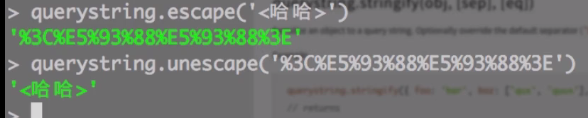
    querystring模块用于实现URL参数字符串与参数对象的互相转换,示例如下。


    querystring.parse('foo=bar&baz=qux&baz=quux&corge');
    /* =>
    { foo: 'bar', baz: ['qux', 'quux'], corge: '' }
    */
     
    querystring.stringify({ foo: 'bar', baz: ['qux', 'quux'], corge: '' });
    /* =>
    'foo=bar&baz=qux&baz=quux&corge='
    */

    querystring


  • node url模块介绍


    var url = require("url");  //要先加载url模块
    var wo=url.parse('https://sdeno.com:8080/zp/js/23.php?123=456&789=999#hhh');
    console.log(wo.protocol); // http:
    console.log(wo.host); // www.xgllseo.com:8080
    console.log(wo.port);// 8080
    console.log(wo.hostname);// www.xgllseo.com
    console.log(wo.hash);// #hhh
    console.log(wo.search);// ?123=456&789=999
    console.log(wo.query);// 123=456&789=999
    console.log(wo.pathname);// /zp/js/23.php
    console.log(wo.path);// /zp/js/23.php?123=456&789=999
    console.log(wo.href);// https://sdeno.com:8080/zp/js/23.php?123=456&789=999#hhh


    var hh=url.format({
     protocol: 'http:',
     host: 'www.example.com',
     pathname: '/p/a/t/h',
     search: 'query=string'
    });
    console.log(url.parse(hh).href);//http://www.example.com/p/a/t/h?query=string


    url.resolve('http://www.example.com/foo/bar', '../baz');
    /* =>
     
    http://www.example.com/baz
     
    */


  • nodejs ejs模板

    node.js node js ejs 模板循环 jquery ejs 笔记


    <% %> //解析js代码
    <% for(var i=0; i<4; ++i) { %> 
       <% if(i==2){ break; }%>
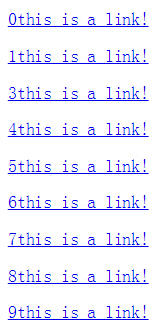
       <p><a href=#"><%= i %>this is a link!</a> </p>
    <% } %>
    
    <%= code %> //不解析html标签,直接输出html标签
    <%- code %> //解析html标签

    循环结果

    ejsmuban


    js和css的获取,都要放在指定目录

    <link rel="stylesheet" type="text/css" href="/1.css" />
    <script src="/javascripts/ejs.min.js"></script>


    引入其他模板

    <%- include foot %>  //引入foot.ejs


    json ajax get

    <script src="/javascripts/ejs_production.js"></script>
    <script type = "text/javascript" > 
    function myfunction(){ 
      var data='{"title":"cleaning","supplies":["mop","broom","duster"]}'; 
      var html = new EJS({url: './mm/cleaning.ejs'}).render(JSON.parse(data)); 
      document.getElementById("div1").innerHTML=html; 
    } 
    </script>
    <button onclick = "myfunction()" >点击</button> <div id="div1"></div>
    .\public\mm\cleaning.ejs 内容已经存放的目录
    
    <h1><%= title %></h1> 
    <ul> 
      <% for(var y=0;y<supplies.length;y++) { %> 
       <li><a href='<%= supplies[y] %>'><%= supplies[y] %></a> </li> 
      <% } %> 
    </ul>