作者: admin

  • nodejs为express框架额外添加js路由

    我们都知道安装好的express可以在routes目录下编辑默认为我们提供的index.js文件可以处理业务逻辑,但是问题来了如果网站内容多了总不能都把全部的代码都写在一个index.js文件里面吧?


    可以适当的添加扩展出来一个js路由文件,这里也是对我这个新手来说第一次时候时候的疑问要怎么扩展多出来一个js文件呢?其实安装好express框架时候app.js已经有注释提示了。


    编辑app.js

    var routes = require('./routes/index');
    var users = require('./routes/index123');//额外添加了一个路由
    .
    .
    app.use('/', routes);
    app.use('/', users); //调用额外添加的路由
    
    这样就能扩展出来一个路由了


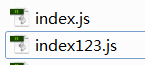
    routes目录

    routes1


  • css文字渐变遮挡效果

    字体 文字一半颜色不同效果

    font_css

    css_show


    自己写的

    font_tran

    <style>
     #out{ border:1px solid red; width:200px; position:relative;overflow: hidden;}
     #out:after{content: attr(data-title);background:blue; color:#fff; display:block; text-align:center}
     #out a{ display:block; text-align:center;}
     #out>div{ position:absolute; top:0px; left:0px; width:45%; height:18px;overflow: hidden;}
     .show{ background:blue; color:#fff; width:100%;}
     .hide{ background:#ccc; color:#fff;width:200px; height:18px; display:block;}
    </style>
    </head>
    
    <body>
     <div id="out" data-title="文字文字文字">
     <div><a class="hide">文字文字文字</a></div>
     </div>
    </body>

    http://pan.baidu.com/s/1i32N8ED


    WX20170609-112410

    <div style="background: #ff9295;width: 400px;position: relative;height: 44px;text-align: center">
     <div style="position: absolute;height: 44px;width: 48%;overflow: hidden;">
        <div style="height: 44px;width: 400px;background: #fd5054;text-align: center">
           立即投资
        </div>
     </div>
     立即投资
    </div>


  • nodejs设置获取cookies案例

    nodejs cookies

    设置cookies可以参考《jquery.cookie.js使用介绍


    如何在nodejs获取cookies值?

    本教程结合了express框架

    1,检查app.js是否加载了cookie-parser模块

    var cookieParser = require('cookie-parser');
    .
    .
    app.use(cookieParser());


    2,在路由获取值

    req.cookies  //返回的是一个对象根据设置的cookies的名字来获取相应的值如:
    
    req.cookies.hello


    3,设置值

    res.cookie('hack', 1, {maxAge: 60 * 1000});
    res.cookie('name', 'tobi', {'domain':'.example.com', 'path':'/admin', 'secure':true});
    res.cookie('remenberme', '1', {'expires':new Date(Date.now() + 90000), 'httpOnly':true});


    4,删除

    res.clearCookie('hack');


    设置参数:

     domain:cookie在什么域名下有效,类型为String,。默认为网站域名
     expires: cookie过期时间,类型为Date。如果没有设置或者设置为0,那么该cookie只在这个这个session有效,即关闭浏览器后,这个cookie会被浏览器删除。
     httpOnly: 只能被web server访问,类型Boolean。
     maxAge: 实现expires的功能,设置cookie过期的时间,类型为String,指明从现在开始,多少毫秒以后,cookie到期。
     path: cookie在什么路径下有效,默认为'/',类型为String
     secure:只能被HTTPS使用,类型Boolean,默认为false
     signed:使用签名,类型Boolean,默认为false。`express会使用req.secret来完成签名,需要cookie-parser配合使用`
  • nodejs在express中应用Handlebars模板

    Handlebars模板 教程 Handlebars

    {{ }} //不解析html标签而是直接显示出来

    {{{ }}} //解析html标签
    {{#if author}} //定义了author属性就输出以下
    <h1>{{firstName}} {{lastName}}</h1>
    {{/if}}
    {{#if author}}
    <h1>{{firstName}} {{lastName}}</h1>
    {{else}}
    <h1>Unknown Author</h1>
    {{/if}}

     
    {{#unless license}} //#unless 和 if 相反 ,条件为假时才执行
    <h3 class=”warning”>WARNING: This entry does not have a license!</h3>
    {{/unless}}


    {{author.name}} {{author.id}}

    author:{ name: “Yehuda Katz”,id:187}
    {{#each people}}
    <li>{{this}}</li>
    {{/each}}

    people:{ a:[‘a1′,’a2’],b:[‘b1′,’b2’] }

    <li>a1,a2</li>
    <li>b1,b2</li>


    {{#each people}}
    <li>{{this}}</li>
    {{/each}}

    people:[ [‘a1′,’a2’],[‘b1′,’b2’] ]

    <li>a1,a2</li>
    <li>b1,b2</li>

     
    {{#each paragraphs}} //有定义paragraphs就遍历
    <p>{{this}}</p>
    {{else}} 没有就输出以下
    <p class=”empty”>No content</p>
    {{/each}}
    paragraphs:[ [‘a1′,’a2’],[‘b1′,’b2’] ],

     
    为遍历添加索引
    {{#each array}}
    {{@index}}: {{this}}
    {{/each}}


    为遍历获取键值对
    {{#each object}}
    {{@key}}: {{this}}
    {{/each}}


    http://segmentfault.com/a/1190000000342636?from=androidqq
  • nodejs指定加载js和css文件

    不是每个页面都加载一样的js和css文件而已选择性的加载需要的文件

    这里基于Handlebars模板介绍

    在公共的模板写上

    *这里千万不能写  type="text/script" 不然就出错,让系统自己选择类型就行了如下:
    {{# if showTests }}
      <script src="javascripts/jquery-1.8.3.min.js"></script>
    {{/if}}


    路由:

    router.get('/',function(req,res){
       //res.locals.showTests = 'show';  //哪个页面需要加载就加上这句话
       //res.locals.showTests = req.query.test === 'show';//http://xx/?test=show
        res.render('index',{
           titles:'登录',
           //showTests:'show'
        });
    });
    
    以上3中方法都行
