作者: admin

  • first-child与last-child获取不到元素原因

    html代码如下

    <a href="#" class="button"><</a><a href="#" class="button">></a><div id="f">F</div><div id="s">S</div><div id="t">T</div>

    css代码如下

    .button:last-child {
        background-color#ffd700;
    }

    运行后发现,第二个a的背景颜色并没有变色,真是奇了个怪了.

    想了想,css代码肯定没错,一定是HTML哪里有问题,经过几次修改之后发现,HTML和CSS改成这样就可以了

    <div><a href="#" class="button"><</a><a href="#" class="button">></a></div><div id="f">F</div><div id="s">S</div><div id="t">T</div>

    div .button:last-child {
        background-color#ffd700;
    }

    这时我才恍然大悟,first-child与last-child这2个果然很傲娇很任性,如果父亲元素里的子元素有包含其他不一样的标签时,他们2个是很不听话的.

  • jquery mobile笔记

    jquery mobile 1.4.5

    定义页面

    <div id="page1" data-role="page" data-title="页面title">
      <div data-role="header">头部</div>
      <div data-role="content">
        内容
      </div>
      <div data-role="footer">底部</div>
    </div>

    data-role=”page” //定义一个页面(必写)
    data-role=”header” //声明一个头部(可选)
    data-role=”footer” //声明一个底部(可选)
    data-title=”页面title” //title
    data-role=”button” //按钮样式
    data-role=”dialog” //弹窗

    最好为页面指定一个id,类似id=”page1″,有时获取页面需要到id来跳转

    ——————————
    同一个页面可以写多个data-role=”page”,表示有多个页面,如

    <div id=”page1″ data-role=”page”>内容1</div>
    <div id=”page2″ data-role=”page”>内容2</div>
    表示有2个页面


     链接跳转时

    (在jq mobile中一个超级链接默认就是一个ajax)
    同页面跳转 <a href=”#page1″></a>
    多页模板中的第二个页面 <a href=”index.html#page2″></a>
    不同页面跳转<a href=”index.html”></a>


    禁用ajax

    不是什么页面跳转到适用于ajax的,以下情况均不使用ajax,使用默认跳转方式
    <a href=”http://www.xx.com/”> //跳转到其他域名时
    <a href=”page2.html” rel=”external”>
    <a href=”page2.html” data-ajax=”false”>
    <a href=”page2.html” target=”other”>
    —————————————
    让指定容器页面里面的所有a链接默认都取消ajax

    最前面加上:
    $.mobile.ignoreContentEnabled=’true’;

    在页面容器加上:
    <div id=”page1″ data-role=”page” data-title=”页面title” data-ajax=”false”>
    在id=”page1″的页面容器里面的a链接默认都取消了ajax的功能


    弹窗

    <div id="page1" data-role="dialog">
      <a href="#" onclick="$('#page1').dialog('close')">关闭弹窗</a>
      <a href="page2.html" data-rel="back">返回上一页</a> data-rel="back"属性最好为href指定一个地址
    </div>


     事件

    data-rel="back" 返回上页
    data-transition="pop" 切换效果(好几种343)
    
    以下事件必须写在jquery.mobile-1.4.5.min.js之前
    $( document ).on("mobileinit", function() { //启动jq mobile就触发,仅触发一次
      console.log(1);
    });
    
    
    $( document ).on("pageinit","#page1",function(event) { //切换到#page1页面时就触发一次,仅触发一次
      console.log(1);
    });
    
    
    $( document ).on( "pageshow", "#page1", function( event ) { //每次切换到#page1时都触发
      console.log(222);
    });
    
    
    以上3种比较常用,执行顺序是:
    mobileinit > pageinit > pageshow
    mobileinit和pageinit只能触发一次如果想在重新激活再触发就执行:
    例如:$(document).trigger('mobileinit'); //激活mobileinit


    触摸事件

    //触摸一下屏幕
    $("p").on("tap",function(){   
     $(this).hide();
    });
    
    
    //长按
    $("p").on("taphold",function(){
      $(this).hide();
    });
    
    
    //滑动
    $("p").on("swipe",function(){
      $("span").text("滑动检测!");
    });
    
    
    swipeleft   //左滑动
    swiperight  //右滑动
    scrollstart //用户开始滚动页面时触发
    scrollstop  //用户停止滚动页面时触发


    111111

    事件 描述
    hashchange 启用可标记 #hash 历史,哈希值会在一次独立的点击时发生时变化,比如一个用户点击后退按钮,会通过 hashchange事件进行处理。
    navigate 包裹了 hashchange 和 popstate 的事件
    orientationchange 方向改变事件,在用户垂直或者水平旋转移动设备时触发。
    pagebeforechange 在页面切换之前,触发的事件。使用$.mobile.changePage()来切换页面,此方法触发2个事件,切换之前的pagebeforechange事件,和切换完成后pagechange(成功)或者pagechangefailed(失败)。
    pagebeforecreate 页面初始化时,初始化之前触发。
    pagebeforehide 在页面切换后旧页面隐藏之前,触发的事件。
    pagebeforeload 在加载请求发出之前触发
    pagebeforeshow 在页面切换后显示之前,触发的事件。
    pagechange 在页面切换成功后,触发的事件。使用$.mobile.changePage()来切换页面,此方法触发2个事件,切换之前的pagebeforechange事件,和切换完成后pagechange(成功)或者pagechangefailed(失败)。
    pagechangefailed 在页面切换失败时,触发的事件。使用$.mobile.changePage()来切换页面,此方法触发2个事件,切换之前的pagebeforechange事件,和切换完成后pagechange(成功)或者pagechangefailed(失败)。
    pagecontainerbeforeload 在载入任何请求前触发
    pagecontainerload 在页面成功载入并插入 DOM 后触发
    pagecontainerloadfailed 页面载入失败时触发
    pagecreate 在页面创建成功之后,触发的事件,但增强完成之前。
    pagehide 在页面切换后老页面隐藏之后,触发的事件。
    pageinit 1.4.0 版本后已废弃,使用 pagecreate 替代。在页面页面初始化时,触发的事件。
    pageload 1.4.0 版本后已废弃,使用 pagecontainerload 替代。在页面完全加载成功后触发。
    pageloadfailed 1.4.0 版本后已废弃,使用 pagecontainerloadfailed 替代。如果页面请求失败触发。
    pageremove 在窗口视图从 DOM 中移除外部页面之前触发。
    pageshow 在过渡动画完成后,在”到达”页面触发。
    scrollstart 当用户开始滚动页面时触发。
    scrollstop 当用户停止滚动页面时触发。
    swipe 当用户在元素上水平滑动时触发。
    swipeleft 当用户从左划过元素超过 30px 时触发。
    swiperight 当用户从右划过元素超过 30px 时触发。
    tap 当用户敲击某元素时触发。
    taphold 当元素敲击某元素并保持一秒时触发。
    throttledresize 启用可标记 #hash 历史记录
    updatelayout 由动态显示/隐藏内容的 jQuery Mobile 组件触发。
    vclick 虚拟化的 click 事件处理器
    vmousecancel 虚拟化的 mousecancel 事件处理器
    vmousedown 虚拟化的 mousedown 事件处理器
    vmousemove 虚拟化的 mousemove 事件处理器
    vmouseout 虚拟化的 mouseout 事件处理器
    vmouseover 虚拟化的 mouseover 事件处理器
    vmouseup 虚拟化的 mouseup 事件处理器

    111111
    屏幕水平、垂直事件

    $(window).on("orientationchange",function(event){
       alert("方向是: " + event.orientation);
    });


     预缓存、预加载

    <a href=”index.html” data-prefetch></a> //预加载,会提前把index.html页面内容加载进来
    <div data-role=”page” id=”page2″  data-dom-cache=”true”> //缓存,下次进入到此页面时就不需要请求服务器了


     锚文本跳转

    直接上案例:
    $('a.here').on('click vclick',function(){
       var a_=$( $(this).attr('href') ).get(0).offsetTop;
       $.mobile.silentScroll(a_);
       return false;
    });
    
    <a class="here" href="#fuck">锚记</a>
    .
    .
    .
    <p id="fuck">内容内容内容内容内容内容</p>


  • IE8 CSS hack只有IE8浏览器能识别

    第一种:”\9″:

    基本的写法:

    1..test { color/*\**/blue\9 }

    这个IE6、IE7、IE8都能识别;但是IE8不能识别“*”和“_”的css hack;所以我们可以这样写hack:(转载

    1..header {width:300px;} /* 所有浏览器*/
    2..header {width/*\**/:330px\9;} /* 所有浏览器IE浏览器 */
    3..header {*width:310px;} /* IE7和IE6能识别,IE8和FF不能识别*/
    4..header {_width:290px;} /* IE6能识别,IE7、IE8和FF不能识别*/

    第二种:就是使用IE的条件注释

    具体可以查看这里:http://www.css88.com/archives/705

    其他一些css hack的测试:

    1..color1color:#F00; color/*\**/:#00F /*\**/}/*IE6,IE7,IE8,FF,OP,SA识别*/
    2..color2color:#F00; color /*\**/:#00F /*\9**/}/*IE7,IE8,FF,OP,SA识别*/
    3..color3color:#F00; color/*\**/:#00F \9}/*IE6,IE7,IE8识别*/
    4..color4color:#F00; color /*\**/:#00F\9}/*IE7,IE8识别*//*“color”和“/*\**/”之间有个空格*/

    其中:OP表示Opera,SA表示Safari

  • webpack教程

    webpack就是一个打包工具,可以将多个js、css、图片、coffeescript、less等合并在一起,在调用时就加载一条js文件就行。

    推荐同时全,局部安装

    npm install -g webpack
    npm install webpack


    安装完成后

    webpack -h //有提示说明安装完成


    假如网站的目录结构是这样:
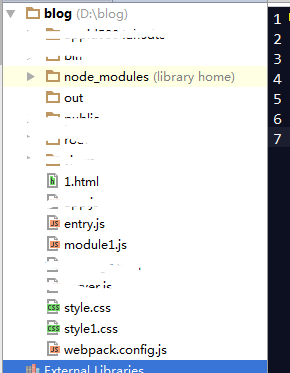
    webpack1


    在根目录手动创建webpack.config.js

    var webpack = require('webpack'); // 加载webpack模块是为了能使用,其内置的插件如BannerPlugin
    var CommonsChunkPlugin = require("webpack/lib/optimize/CommonsChunkPlugin");  //将公共部分JS提取出来独立为一个JS
    var autoprefixer = require('autoprefixer'); //自动添加css前缀 npm install autoprefixer
    
    module.exports = {
       entry: './entry.js', //文件入口,所有的css、js、图片和模块都统一加载在此文件。
       output: {
          path: __dirname+'/out/', //压缩合并输出后存放的目录
          filename: 'bundle.js', //文件出口,压缩合并后文件的名字
          libraryTarget: 'amd' // 输出后的文件bundle.js变成amd模块,就可以在requirejs插件中直接引入使用了
       },
       module: { //压缩合并js以外的内容,如css、图片、coffeescript、less等对应的还要安装相应的模块
         loaders: [
           //如果希望css和跟js一样统一压缩到一起就需要额外安装 npm install css-loader style-loader postcss-loader
           {test: /\.css$/, loader: "style-loader!css-loader!postcss-loader"} //webpack要识别处理css要依赖模块才行,多个模块之间要使用!
           //limit=8192”表示将所有小于8kb的图片都转为base64形式,在out目录下生成大于8KB的img图片
           //(其实应该说超过8kb的才使用 url-loader 来映射到文件,否则转为data url形式)
           //npm install url-loader npm install file-loader
           { test: /\.(png|jpg)$/, loader: 'url-loader?limit=8192&name=img/[hash:8].[name].[ext]'}
         ]
       },
       postcss: [ autoprefixer({ browsers: ['> 0%'] }) ],  //自动添加css前缀
       plugins: [ //扩展webpack额外的功能,要使用webpack自带插件就引入webpack,其他功能的话就额外安装其他插件
           new webpack.BannerPlugin('这个插件功能是头部提示功能'),
           new CommonsChunkPlugin("commons.js", ["js1", "js2", "js3"]),  //js1.js  js2.js  js3.js公共部分独立出来取名为commons.js
           new webpack.optimize.UglifyJsPlugin({compress: {warnings: false}}), //webpack自带的压缩代码功能
           new webpack.ProvidePlugin({  //使用sudo npm install jquery@1.11.0,来调用jq,并将jq暴露打包文件全局中,相当于给window加了jquery
             $:"jquery",  
             jQuery:"jquery",
             "window.jQuery":"jquery"
           }),
           new webpack.NoErrorsPlugin(), //不提示报错信息
           new webpack.optimize.DedupePlugin() //避免加载重复模块
       ],
       resolve: {
          //查找module的话从这里开始查找
          root: 'E:/github/flux-example/src', //绝对路径
          //自动扩展文件后缀名,意味着我们require模块可以省略不写后缀名
          extensions: ['', '.js', '.json', '.scss'],
             //模块别名定义,方便后续直接引用别名,无须多写长长的地址
          alias: {
             AppStore : 'js/stores/AppStores.js',//后续直接 require('AppStore') 即可
             ActionType : 'js/actions/ActionType.js',
             AppAction : 'js/actions/AppAction.js'
          }
        },
        watch: true //每次修改文件,就不需要次次都执行webpack了,或者webpack --watch
    }


    入口文件:

    //entry.js
    if(!Function.prototype.bind){
     Function.prototype.bind = function(){
      var fn = this,
      args = [].slice.call(arguments),
      object = args.shift();
      return function(){
        return fn.apply(object,args.concat([].slice.call(arguments)));
      };
     };
    }
    if (!Array.prototype.filter){
     Array.prototype.filter = function(fun /*, thisp*/){
       var len = this.length;
       if (typeof fun != "function")
       throw new TypeError();
       var res = new Array();
       var thisp = arguments[1];
       for (var i = 0; i < len; i++){
         if (i in this){
         var val = this[i]; // in case fun mutates this
         if (fun.call(thisp, val, i, this))
           res.push(val);
         }
       }
       return res;
     };
    }
    //以上判断是为了兼容ie8
    
    require("./style.css");
    require("./style1.css");
    //require("jquery");  在使用webpack中要使用jq推荐使用sudo npm install jquery@1.11.0,来使用
    require('./module1')


    其他模块(js,css,图片等等都视为模块)

    // 1.html
    <!DOCTYPE html>
    <html>
    <head lang="en">
     <meta charset="UTF-8">
     <title></title>
     <script src="./out/bundle.js"></script>
    </head>
    <body>
    
    
    <div id="big"></div>
    <div id="lititle"></div>
    
    
    </body>
    </html>
    //module1.js
    $(function () {
     document.title=$().jquery;
    });


    //style.css
    body{background: yellow}
    //style1.css
    div{border: 5px solid red;}
    #big{height: 500px;width: 800px}
    #lititle{height: 100px;width: 100px}


    准备工作好了之后 在根目录下输入

    webpack   //系统会默认去找webpack.config.js配置文件
    
    webpack // 最基本的启动webpack的方法
    webpack -w // 提供watch方法;实时进行打包更新
    webpack -p // 对打包后的文件进行压缩
    webpack -d // 提供source map,方便调式代码
    webpack --config webpack.config.js //单独运行webpack.config.js文件,这种情况可以是在运行多个项目的时候使用 
    webpack --watch -webpack.config.js //时时监听文件更新运行webpack方法

    成功运行的提示都这样
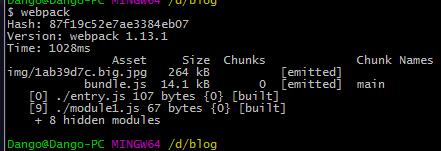
    webpack2

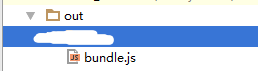
    此时目录下生成了一个js文件如:

    webpack3

    1.html页面只要加载了这个bundle.js就相当于加载了css,js,图片所有的资源了


    发布服务器

    webpack还提供了本地发布测试的功能,一旦修改了文件就自动压缩合并和页面自动刷新,并且还提供了类似iis、apache发布的功能。


    参考学习网站:

    http://zhaoda.net/webpack-handbook/preface.html

    http://www.w2bc.com/Article/50764

    http://blog.csdn.net/yczz/article/details/49250623


  • jade笔记模板教程

    nodejs模板 ejs

    *注意学习使用jade模板时要注意元素的缩进和空格,否则会出错。

    代码概况

    doctype
    html
      head
        title #{title}
        script(type='text/javascript').
         alert(1);
        style.
         body{background: red;}
    
      body
        div#container.wo.haha 1123123
        a(href='http://qq.com' title='haha') 链接
        div: div 1
    
    
    翻译如下:
    <!DOCTYPE html>
    <html>
      <head>
        <title>111</title>
        <script type="text/javascript">
          alert(1);
        </script>
        <style>
          body{background: red;}
        </style>
      </head>
    
      <body>
        <div id="container" class="wo haha">1123123</div>
        <a href="http://qq.com" title="haha">链接</a>
        <div>
          <div>1</div> 
        </div>
      </body>
    </html>


    创建标签

    创建标签
    
    doctype
    <!DOCTYPE html>
    
    
    html
    <html></html>
    
    meta(http-equiv="Content-Type",content="text/html; charset=utf-8")
    <meta http-equiv="Content-Type" content="text/html; charset=utf-8">
    
    
    link(type="text/css",rel="stylesheet",href="./stylesheets/style.css")
    <link type="text/css" rel="stylesheet" href="./stylesheets/style.css">
    
    div
    <div></div>
    
    
    div#container
    <div id="container"></div>


    div#container.wo.haha
    <div id="container" class="wo haha"></div>
    
    
    #foo //由于div用的比较多所以直接这样就可以创建div了
    <div id="foo"></div>


    内嵌(元素的缩进很关键;同级的要并列,内嵌的要缩进)

    方法一
    div
     span
      <div><span></span></div> 
    
    方法二
    div: div 1
      <div><div>1</div></div>


    添加文本内容

    处理小段文本
    p wahoo!
    <p>wahoo!</p>
    
    
    处理大段文本 
    效果还是在同一行上但是有了层次感
    p 
     | foo bar baz
     | rawr rawr
     | super cool
     | go jade go
     | &nbsp;
    <p>foo bar baz rawr.....&nbsp;</p>
    
    
    p.
     123sdf
     sdfsdfdsf
     sdfdf
    <p>123sdf sdfsdfdsf sdfdf</p>


    p 这里是<b>文字</b> //解析html
    <p>这里是<b>文字</b></p>
    
    
    p= '这里是<b>文字</b>' //不解析html
    <p>这里是&lt;b&gt;文字&lt;/b&gt;</p>


    html识别和转义

    //不识别html
    - var wo='<span style="color:red"></span>'
    div #{wo}
    或者
    div= wo
    
    输出:&lt;span style=&quot;color:red&quot;&gt;&lt;/span&gt;
    
    
    //识别html
    - var wo='<span style="color:red"></span>'
    div !{wo}
    或者
    div!= wo
    输出:<span style="color:red"></span>


    变量

    例如数据是{tit:'标题'}
    title #{tit}
    <title>标题</title>
    
    
    - var name = 'yaochun'
    p my name is #{name}
    <p>my name is yaochun</p>


    | !{"<script>alert(1)</script>"}
    <script>alert(1)</script>


    - var name = '<script></script>'
    | #{name}
    &lt;script&gt;&lt;/script&gt;


    - var html = "<script src='javascripts/jquery-1.8.3.min.js'></script>"
    | !{html}
    <script src="javascripts/jquery-1.8.3.min.js"></script>


    | !{'<link href="https://sdeno.com/wp-content/themes/flat_ui/css/flat-ui.min.css" rel="stylesheet">'}


    script(type='text/javascript').
     $(function(){
     alert( $().jquery );
     });
    
    
    style.
     #container{border: 1px solid red;}


    变量输出表达式

    - var wo="<div>"
    div #{wo}  或者  div= wo    
    
    另外 div !{wo}  div!= wo //就可以直接在页面中识别出html标签而不转化为&lt; &quot;


    嵌入js语法

    -function run(str){return str.replace(/(<a .+?>)|(<\/a>)/ig,"");}  //只移除a标签
      !{delHtmlTag(  val.post_con  )}


    引入外部文件

    include head/head.jade   //引入head目录下的head.jade
    include head.jade        //引入跟目录下的head.jade
    
    extends ./layout.jade   标识符block 涉及到继承问题,引入的内容要被当前内容覆盖
    
    script(type="text/javascript",src='./javascripts/1.js')
    <script type="text/javascript" src="./javascripts/1.js"></script>
    
    link(type="text/css",rel="stylesheet",href="./stylesheets/style.css")
    <link type="text/css" rel="stylesheet" href="./stylesheets/style.css">


    元素属性设置用()

    input(value='值' disabled='disabled')#haha.txt
    <input value="值" disabled="disabled" id="haha" class="txt">
    
    a(href='http://qq.com' title='haha') 链接
    <a href="http://qq.com" title="haha">链接</a>


    直接显示表达式

    p \#{tit}
    <p>#{tit}</p>


    IE hack css

    IE 10以上版本不识别

    | !{' <!--[if gte IE 7]> <link href="css/flat-ui.min.css" rel="stylesheet"> <![endif]--> '}   //只有大于IE7才能识别
    
    <!--[if gte IE 7]> <link href="css/flat-ui.min.css" rel="stylesheet"> <![endif]-->


     条件语句

    if title=='1111'
      p You are owner!
    else
      p You are #{title},and you are not owner!


    类似switch语句
    - friends = 1
      case friends
        when 0
           p you have no friends
        when 1
           p you have a friend
        default
           p you have #{title} friends
    
    
    合并 when,满足friends = 0或者friends = 1都执行p you have a friend
    - friends = 0
      case friends
        when 0
        when 1
          p you have a friend
        default
          p you have #{title} friends


    循环遍历

    - for (var i = 0; i < 3; i++)
        li #{i}
    
    <li>0</li>
    <li>1</li>
    <li>2</li>
    
    -----------------------------------
    
    - var jobs = ["fe", "wandoujia"]
    each job in jobs
      li= job
    
    <li>fe</li>
    <li>wandoujia</li>
    
    ------------------------------------
    
    - var jobs = {"catagory" : "fe", "company" : "wandoujia", "local" : "beijing"}
    each val,key in jobs
      li #{key} : #{val}
    
    <li>catagory : fe</li>
    <li>company : wandoujia</li>
    <li>local : beijing</li>


    http://ju.outofmemory.cn/entry/143002

     http://expressjs.jser.us/jade.html