资源的合并压缩一般都借助nodejs的模块功能,如果不会使用或者只是进行几个文件简单的压缩合并也用不了安装node
可以利用网上的在线压缩功能
集合和压缩合并css、js的网站:http://tool.oschina.net/jscompress
https://www.baidufe.com/fehelper/codecompress.html
合并也可以使用window自带的功能,在dos中
//注意顺序1.js压缩后最先执行
copy 1.js+2.js 3.js /b
资源的合并压缩一般都借助nodejs的模块功能,如果不会使用或者只是进行几个文件简单的压缩合并也用不了安装node
可以利用网上的在线压缩功能
集合和压缩合并css、js的网站:http://tool.oschina.net/jscompress
https://www.baidufe.com/fehelper/codecompress.html
合并也可以使用window自带的功能,在dos中
//注意顺序1.js压缩后最先执行 copy 1.js+2.js 3.js /b
百度提供了一个简单插件uaredirect.js判断手机还是电脑pc端跳转到相应的页面。
简单来说如果是手机访问了某个地址,根据uaredirect.js的判断是手机的话就自动跳转到专门为手机浏览的页面,否则就不需要跳转
//推荐放在css、JS前面。先判断设备在跳转

<script src="http://siteapp.baidu.com/static/webappservice/uaredirect.js" type="text/javascript"></script>
<script type="text/javascript">uaredirect("http://m.52img.cn","http://www.52img.cn");</script>
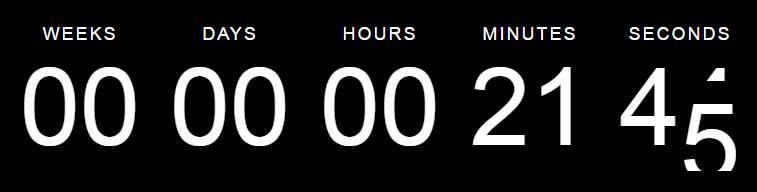
兼容性:E 6, IE 7, IE 8, FF 3, Safari 4, Opera 9, Chrome 4
倒计时只需要设置结束时间即可。
可以同时多设置几个
例如:要在2017年1月10号11时00分00秒过期,页面直接就会显示剩余时间倒计时
targetDate: {
 'day': 10,
 'month': 1,
 'year': 2017,
 'hour': 11,
 'min': 0,
 'sec': 0
}
$('#countdown_dashboard').countDown({
 targetDate: {
  'day': 10,
  'month': 1,
  'year': 3037,
  'hour': 11,
  'min': 0,
  'sec': 0,
  'utc': true  //按标准时间
 },
 onComplete: function() { alert(1) },  //回调
 omitWeeks: true  //不显示周
});


// Stop countdown
function stop() {
  $('#countdown_dashboard').stopCountDown();
}


// Start countdown
function start() {
 $('#countdown_dashboard').startCountDown();
}


// reset and start
 function reset() {
    $('#countdown_dashboard').stopCountDown();
    $('#countdown_dashboard').setCountDown({
       targetOffset: {
        'day': 1,
        'month': 1,
        'year': 0,
        'hour': 1,
        'min': 1,
        'sec': 1
       }
     });
     $('#countdown_dashboard').startCountDown();
  }
手机 百度 touch
禁用长按文本被选中
*{
-webkit-touch-callout:none;
 -moz-user-select: none; /*火狐*/
 -webkit-user-select: none; /*webkit浏览器*/
 -ms-user-select: none; /*IE10*/
 -khtml-user-select: none; /*早期浏览器*/
 user-select: none;
}
touchstart / touchmove / touchend / touchcancel 是html5为移动设备提供的手势触发事件
当一些更高级别的事件发生的时候(如电话接入或者弹出信息)会取消当前的touch操作,即触发ontouchcancel。一般会在ontouchcancel时暂停游戏、存档等操作。
案例:
<div ontouchstart="fn()"></div>
或者
$('div').on('touchstart',function(){});
长按tap思路:
利用touchstart,手指放在手机屏幕上但不拿起这样触发了touchstart,在这过程中执行一个fn,此fn又不断的自调用执行相应的逻辑,直到手指从屏幕中拿起触发touchend和touchcencel,结束此fn的调用。
注意要做bug处理,在滑动的时候就禁止长按触发。
//长按
function $tap(dom,fn){
   $(dom).on('touchstart',function(e){
      var touch_time=new Date()/1000; //记录手指放在屏幕上的时间

      tap_run();
      function tap_run(){
          e.preventDefault();
          e.stopPropagation();
          var nowtime=new Date()/1000;
          var move_time= nowtime-touch_time;
          $.globalEval("var time_id=null");
          time_id=setTimeout(tap_run,100);
          $(this).on('touchmove',function(){ //滑动的时候禁止长按效果触发
            $('#p2').text('滑动');
            clearTimeout(time_id);
          });
          if(move_time>1){ //手指放在屏幕上大于1秒后触发长按效果
             (fn)();
             clearTimeout(time_id);
          }
       }

   });
 }


调用:
$tap('body',function(){
   $('#p1').text('长按');
});
长按案例:
https://sdeno.com/wp-content/uploads/2016/08/tap/tap.html