作者: admin

  • js判断昨天、今天、明天

    js如何判断昨天、今天、明天

    function GetDateStr(AddDayCount) {
     var dd = new Date();
     dd.setDate(dd.getDate()+AddDayCount);//获取AddDayCount天后的日期
     var y = dd.getFullYear();
     var m = dd.getMonth()+1;//获取当前月份的日期
     var d = dd.getDate();
     return y+"-"+m+"-"+d;
    }
    // document.write("前天:"+GetDateStr(-2));
    // document.write("<br />昨天:"+GetDateStr(-1));
    // document.write("<br />今天:"+GetDateStr(0));
    // document.write("<br />明天:"+GetDateStr(1));
    // document.write("<br />后天:"+GetDateStr(2));
    // document.write("<br />大后天:"+GetDateStr(3));
  • ubuntu 16.04 nginx+apache组合 nginx反向代理

    nginx负责处理静态页面就是html标签,apache负责处理php脚本,对于那些访问量大的网站来说这样的组合是比较高效的。

    本博客就是使用这样的组合搭建的。


    配置方法:

    1,在此之前需要安装了lamp环境,可以参考https://sdeno.com/?p=5280

    之后修改apache的默认端口为8080,在路径/etc/apache2/ports.conf


    2,安装nginx服务端sudo apt-get install nginx,nginx负责监听80端口过滤静态请求,然后动态请求即Proxy 到Apache 的8080 端口。Proxy 反向代理的好处是访问的时候,始终就是80端口,来访者不会觉察到有任何的区别。(我安装的版本为nginx/1.10.0)


    3,配置nginx

    安装完成nginx之后测试下是否成功,nginx和apache一样默认web路径都是/var/www/html,

    访问:http://localhost/index.nginx-debian.html  看看是否能成功。

    进入到目录 /etc/nginx/sites-available/  创建一个文件名为test的文件内容是:

    //以下是对php网站的设置
    
    server {
      listen 80;
      access_log /var/www/html/nginx.access.log;
      error_log /var/www/html/nginx.error.log;
      root /var/www/html;
      index index.php index.html;
      server_name www.xgllseo.com xgllseo.com;
      location \ {
        try_files $uri $uri/ index.php/$uri;
      }
      location ~* ^.*\.php$ {
        if (!-f $request_filename) {
           return 404;
        }
        proxy_set_header X-Real-IP $remote_addr;
        proxy_set_header X-Forwarded-For $proxy_add_x_forwarded_for;
        proxy_set_header Host $host;
        proxy_pass http://127.0.0.1:8080; (前提要保证https://sdeno.com:8080/这样能正常访问到,也就是要绑定域名和修改端口)
      }
      location ~ /\.(ht|git) {
        deny all;
      }
    }


    //node.js配置可以是
    server{
      listen 80;
      server_name xx.com www.xx.com;
      location /{
        proxy_pass http://127.0.0.1:3000;
        proxy_http_version 1.1;
        proxy_set_header Upgrade $http_upgrade;
        proxy_set_header Connection 'upgrade';
        proxy_set_header Host $host;
        proxy_set_header X-Forwarded-For $proxy_add_x_forwarded_for;
        proxy_set_header X-Real-IP $remote_addr;
        proxy_cache_bypass $http_upgrade;  
      }
      access_log /var/www/node/node.log;
    }


    //为node.js设置内存缓存
    http {
     proxy_cache_path /var/cache/nginx levels=1:2 keys_zone=one:8m max_size=3000m inactive=600m;
     proxy_temp_path /var/tmp;
     include mime.types;
     default_type application/octet-stream;
     sendfile on;
     keepalive_timeout 65;
     
     gzip on;
     gzip_comp_level 6;
     gzip_vary on;
     gzip_min_length 1000;
     gzip_proxied any;
     gzip_types text/plain text/htm text/css application/json application/x-javascript text/xml application/xml application/xml+rss text/javascript;
     gzip_buffers 16 8k;
     
     ssl_certificate /root/www/Nginx/1_www.easynode.cn_bundle.crt;
     ssl_certificate_key /root/www/Nginx/2_www.easynode.cn.key;
     ssl_protocols SSLv3 TLSv1 TLSv1.1 TLSv1.2;
     ssl_ciphers ECDHE-RSA-AES128-GCM-SHA256:ECDHE-ECDSA-AES128-GCM-SHA256:ECDHE-RSA-AES256-GCM-SHA384:ECDHE-ECDSA-AES256-GCM-SHA384:DHE-RSA-AES128-GCM-SHA256:kEDH+AESGCM:ECDHE-RSA-AES128-SHA256:ECDHE-ECDSA-AES128-SHA256:ECDHE-RSA-AES128-SHA:ECDHE-ECDSA-AES128-SHA:ECDHE-RSA-AES256-SHA384:ECDHE-ECDSA-AES256-SHA384:ECDHE-RSA-AES256-SHA:ECDHE-ECDSA-AES256-SHA:DHE-RSA-AES128-SHA256:DHE-RSA-AES128-SHA:DHE-RSA-AES256-SHA256:DHE-RSA-AES256-SHA:!aNULL:!eNULL:!EXPORT:!DSS:!DES:!RC4:!3DES:!MD5:!PSK;
     ssl_prefer_server_ciphers on;
     
     upstream silly_face_society_upstream {
     server 127.0.0.1:3011;
     #server 127.0.0.1:61338;
     keepalive 64;
     }
     
     #server {
     # listen 80;
     #listen 443 ssl;
     
     # server_name easynode.cn;
     #return 301 $scheme://www.sillyfacesociety.com$request_uri;
     #}
     
     server {
     listen 80;
     #listen 443 ssl;
     
     server_name www.easynode.cn;
     
     #error_page 502 /errors/502.html;
     
      #if ($scheme = http) { #80端口跳转443
      #   return 301 https://$server_name$request_uri;
      #}
     #location ~ ^/(images/|img/|javascript/|js/|css/|stylesheets/|flash/|media/|static/|robots.txt|humans.txt|favicon.ico) {
     #root /root/www/easynode/public;
     #access_log off;
     #expires max;
     #}
     
    location ~ .*\.(woff|eot|svg|ttf|favicon.ico|gif|jpg|jpeg|png|bmp|swf)$
    {
    #expires 30d;
    expires max;
    root /root/www/easynode/public; #重点
    }
    
    location ~ .*\.(js|css)?$
    {
    #expires 12h;
    expires max;
    root /root/www/easynode/public; #重点
    }
     
     #location /errors {
     # internal;
     # alias /usr/local/silly_face_society/node/public/errors;
     #}
     
     location / {
     proxy_redirect off;
     proxy_set_header X-Real-IP $remote_addr;
     proxy_set_header X-Forwarded-For $proxy_add_x_forwarded_for;
     proxy_set_header X-Forwarded-Proto $scheme;
     proxy_set_header Host $http_host;
     proxy_set_header X-NginX-Proxy true;
     proxy_set_header Connection "";
     proxy_http_version 1.1;
     proxy_cache one;
     proxy_cache_key sfs$request_uri$scheme;
     proxy_pass http://silly_face_society_upstream;
     }
     }
    }


    创建软链接

    sudo ln -s /etc/nginx/sites-available/test /etc/nginx/sites-enabled/test

    这时候就会在 sites-enabled目录下看到刚刚的test配置被启动了

    sudo /etc/init.d/nginx restart  重启nginx如果OK说明没问题


    4,配置apache

    在/etc/apache2/sites-available/目录下创建名为test.conf的文件内容是:

    <VirtualHost *:8080>
     ServerAdmin webmaster@localhost
     DocumentRoot /var/www/html
    </VirtualHost>


    创建软链接

    sudo ln -s /etc/apache2/sites-available/test.conf /etc/apache2/sites-enabled/test.conf

    在sites-enabled目录能看到刚刚的test.conf说明也启动成功。


    接着按照下面顺序执行下

    sudo a2ensite test
    sudo /etc/init.d/apache2 restart
    sudo /etc/init.d/apache2 reload


    5,尝试下是否成功,

    在/var/www/html/目录下创建1.php内容为<?php phpinfo();?>的php文件,

    访问:http://localhost/1.php 。

    如果成功那就完成了。


    http://www.2cto.com/os/201202/119597.html 

  • html5记录缓存video视频播放记录

    我们在使用html5播放视频时,有时候会因为中途关闭网站或者其他原因网页被关闭,这时候如果我们再次打开之前的视频网站时,希望记录着我们之前看过的视频记录。

    我们可以使用video标签的currentTime属性。


    设置/获取视频已经播放的时间

    video.currentTime  //获取视频已经播放的记录
    video.currentTime=5  //设置从第5秒开始播放(也就是视频已经播放了5秒)


    获取视频总时间

    video.duration


    计算视频剩下时间

    video.duration-video.currentTime


    在使用html5的localStorage、sessionStorage或者cookies存储,下次打开就可以记录之前播放视频的了。

    关于html5的存储可以参考《web storage和cookie区别以及store.js使用


  • css未来新的布局方式—Flex布局

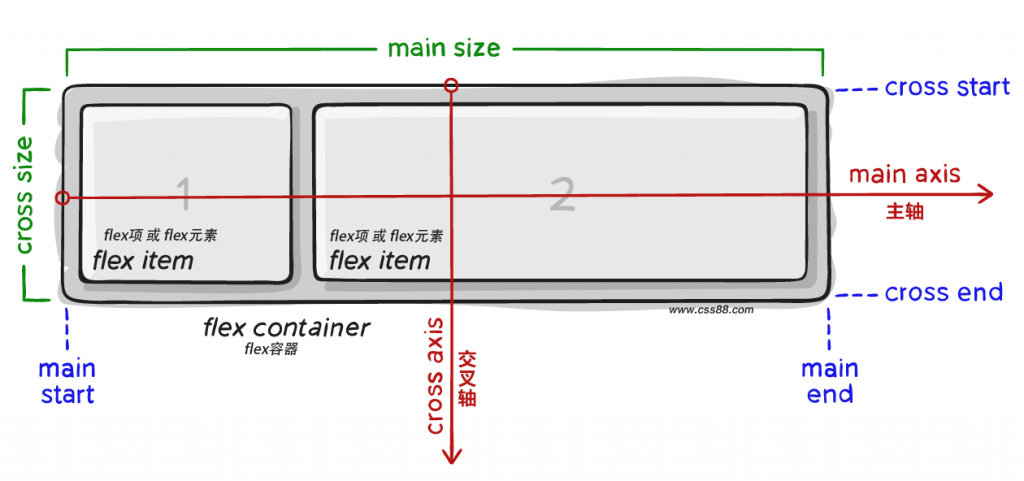
    要了解什么主轴、交叉轴不然后面知识很难理解。上图是主轴和交叉轴的默认方向情况,一般都不会去改变。主轴不一定是水平方向,也可以是垂直方向。主轴决定着交叉轴的方向。所以主轴方向决定着flex布局。flex-direction属性决定着主轴方向。


    Flex有老的属性和值,这里推荐使用新的属性和值

    新版语法

    定义容器的display属性

    .box{

        display:-webkit-flex;/*webkit*/

        display:flex;

    }


    /*行内flex*/

    .box{

        display:-webkit-inline-flex;/*webkit*/

        display:inline-flex;

    }

    *flex容器里面的所有子元素都会变成、内联元素、高度自适应。仅仅是作用子元素,子元素里面的元素不受影响。


    容器样式

    .box{

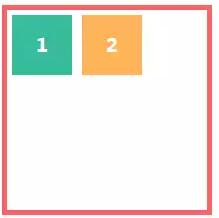
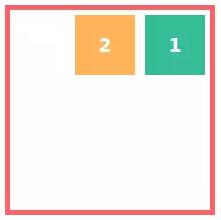
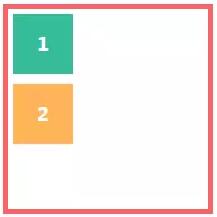
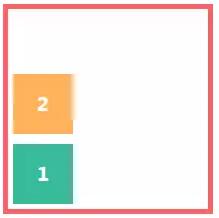
        flex-direction:row|row-reverse|column|column-reverse;     水平左对齐 | 水平右对齐且倒序 | 垂直(主轴顺时针旋转90度) | 垂直且倒序

        /*主轴方向:左到右(默认) | 右到左 | 上到下 | 下到上*/


        flex-wrap:nowrap|wrap|wrap-reverse;    子元素超出容器的宽度时       不换行  |  换行,但换行的内容垂直方法左对齐  |  子元素在容器底部 ,换行内容在原来内容底部切垂直方法左对齐,(使用wrap时,容器最好是height:100%,不然换行会有间隙)

        /*换行:不换行(默认) | 换行 | 换行并第一行在下方*/


        flex-flow:<flex-direction>||<flex-wrap>;    以上两个属性可以用这个属性合并。

        /*主轴方向和换行简写*/


        justify-content:flex-start|flex-end|center|space-between|space-around;    水平方向:  左对齐 | 右对齐 | 居中| 容器两边会顶着子元素且平均间隔 | 子元素之间平均间隔

        /*主轴对齐方式:左对齐(默认) | 右对齐 | 居中对齐 | 两端对齐 | 平均分布*/


        align-items:flex-start|flex-end|center|baseline|stretch;    垂直方向(交叉轴):     垂直顶部 | 垂直底部 | 垂直中

        /*交叉轴对齐方式:顶部对齐(默认) | 底部对齐 | 居中对齐 | 上下对齐并铺满 | 文本基线对齐*/


        align-content:flex-start|flex-end|center|space-between|space-around|stretch;    注意:当只有一行 flex 项时,此属性不起作用。

        /*多主轴对齐:顶部对齐(默认) | 底部对齐 | 居中对齐 | 上下对齐并铺满 | 上下平均分布*/

    }

    子元素属性

    .item{

        order:<integer>;

        /*排序:数值越小,越排前,默认为0*/  控制子元素的排列位置


        flex-grow:<number>;/* default 0 */

        /*放大:默认0(即如果有剩余空间也不放大,值为1则放大,2是1的双倍大小,以此类推)*/  元素的占位百分比


        flex-shrink:<number>;/* default 1 */  不推荐修改

        /*缩小:默认1(如果空间不足则会缩小,值为0不缩小)*/


        flex-basis:<length>|auto;/* default auto */  不推荐修改

        /*固定大小:默认为0,可以设置px值,也可以设置百分比大小*/


        flex:none|[<‘flex-grow’><‘flex-shrink’>?||<‘flex-basis’>]

        /*flex-grow, flex-shrink 和 flex-basis的简写,默认值为0 1 auto,*/


        align-self:auto|flex-start|flex-end|center|baseline|stretch;

        /*单独对齐方式:自动(默认) | 顶部对齐 | 底部对齐 | 居中对齐 | 上下对齐并铺满 | 文本基线对齐*/  单独的子元素对齐

    }


     兼容写法:

    定义容器的 display 属性:

    .box{

        display:-webkit-box;/* 老版本语法: Safari, iOS, Android browser, older WebKit browsers. */

        display:-moz-box;/* 老版本语法: Firefox (buggy) */

        display:-ms-flexbox;/* 混合版本语法: IE 10 */

        display:-webkit-flex;/* 新版本语法: Chrome 21+ */

        display:flex;/* 新版本语法: Opera 12.1, Firefox 22+ */

    }


    子元素主轴对齐方式(水平方向)

    .box{

        -webkit-box-pack:center;

        -moz-justify-content:center;

        -webkit-justify-content:center;

        justify-content:center;

    }

    flex9


    子元素交叉轴对齐方式(垂直)

    .box{

        -webkit-box-align:center;

        -moz-align-items:center;

        -webkit-align-items:center;

        align-items:center;

    }

    flex8


    子元素的显示方向

    .box{

        -webkit-box-direction:normal;

        -webkit-box-orient:horizontal;

        -moz-flex-direction:row;

        -webkit-flex-direction:row;

        flex-direction:row;

    }

    flex7


    右到左

    .box{

        -webkit-box-pack:end;

        -webkit-box-direction:reverse;

        -webkit-box-orient:horizontal;

        -moz-flex-direction:row-reverse;

        -webkit-flex-direction:row-reverse;

        flex-direction:row-reverse;

    }

    flex6


    上到下

    .box{

        -webkit-box-direction:normal;

        -webkit-box-orient:vertical;

        -moz-flex-direction:column;

        -webkit-flex-direction:column;

        flex-direction:column;

    }

    flex5


    下到上

    .box{

        -webkit-box-pack:end;

        -webkit-box-direction:reverse;

        -webkit-box-orient:vertical;

        -moz-flex-direction:column-reverse;

        -webkit-flex-direction:column-reverse;

        flex-direction:column-reverse;

    }

    flex4


    是否允许子元素伸缩

    .item{

        -webkit-box-flex:1.0;

        -moz-flex-grow:1;

        -webkit-flex-grow:1;

        flex-grow:1;

    }

    flex3


    .item{

        -webkit-box-flex:1.0;

        -moz-flex-shrink:1;

        -webkit-flex-shrink:1;

        flex-shrink:1;

    }

    flex2


    子元素的显示次序

    .item{

        -webkit-box-ordinal-group:1;

        -moz-order:1;

        -webkit-order:1;

        order:1;

    }

    flex1


    www.css88.com/archives/8629

     微信地址

    https://segmentfault.com/a/1190000003978624

     推荐:http://www.ruanyifeng.com/blog/2015/07/flex-grammar.html
     

  • CSS伪元素 :after :befor

    :after :befor 主要是文本内容的插入

    IE8支持 :符号

    功能1:
    .test:after{content:'123'}
    <div class="test" id="aaa">插入的内容是:</div>
    
    效果就是:
    插入的内容是:123
    
    
    功能2:
    获取元素本身属性的值在插入内容
    .test:after{content:attr(id)}
    <div class="test" id="aaa">插入的内容是:</div>
    
    效果就是:
    插入的内容是:aaa

    在css3中 ::after ::befor其实跟css2中的:after :befor功能是一样的,只是为了区别伪类选择符而已,即:(:hover这些)

    在css3的语法中

    :是伪类选择符

    ::是伪对象选择符

    可以参考:https://sdeno.com/book/css/selectors/pseudo-element/index.htm